Twilio Frontline Overview
The Twilio Frontline mobile application leverages the Twilio Conversations API to allow deskless employees to communicate with their customers using the Frontline mobile application. To understand how Frontline works under the hood, take a look at the diagram below:
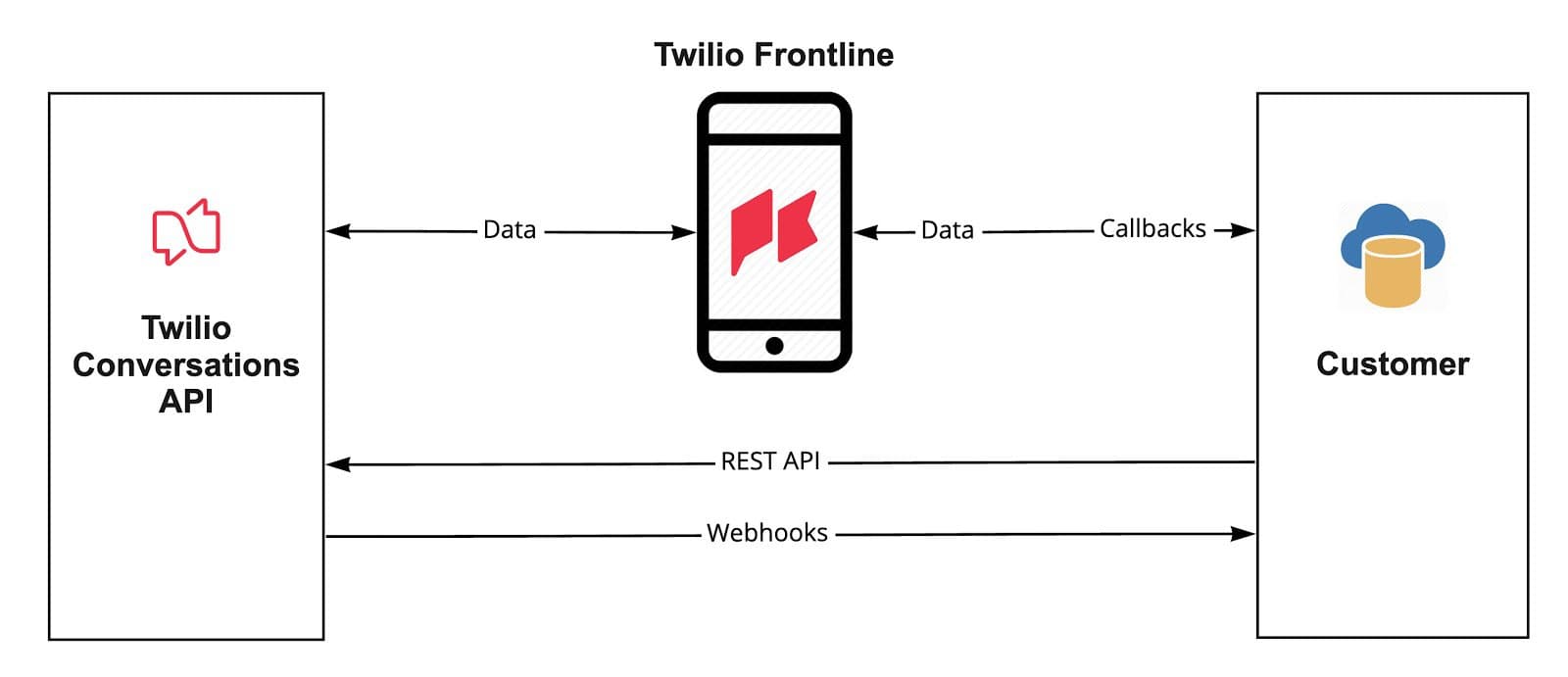
Note that there are three interfaces working together: Twilio Conversations API, the Twilio Frontline mobile app and the Customer Resource. The Conversations API powers Frontline's main functionality, while Customer Resource controls everything through the Conversations API and Twilio Frontline Callbacks. It represents a backend service which will return customer information to Frontline when required.
Every conversation that a Frontline app user can see and every message that a user will send or receive is coming from the Conversations API. This means that Frontline can be controlled through the Conversations REST API. For example: Conversations can be created, updated, or deleted using the Conversations API. For more information on the Conversations API, please see theConversations API reference guide.
In addition to the Conversations API the Frontline app exposes a set of interfaces and Callbacks.
A Callback lets an application know what to do when a particular event occurs. For the Frontline mobile app, when a user performs an action like navigating to the "My Customers" screen — Frontline will make a network request to the configured CRM callback URL to get a list of customers in JSON format. With that information, the App can render its UI. In other words, Callback is a way to get information that is missing in Conversations API but is required for Twilio Frontline to make it work. It's an extension of Conversations API.
You can subscribe to Callbacks the same way you subscribe to Webhooks — configure a URL which will process an incoming request and respond back in a certain format.
Let's learn more about the Frontline Integration Service, so you're ready to start building with Frontline!