Outgoing Conversations
So far we have seen ways to programmatically create a new conversation by either processing an incoming message or doing a direct API call, but how can an app user do that? Twilio Frontline has a dedicated Outgoing Conversation callback for that. Whenever a user initiates a new conversation from the Customer Details screen, the app will make an API request to the configured callback URL to facilitate the process.
When a user initiates a new conversation, the app does the following:
- Creates a new conversation
- Calls an outgoing callback with GetProxyAddress location. In order to add a customer to conversation the app needs to know how they're in contact with — i.e. what phone number or WA number they reach out to at — your business.
- Adds a customer to the new conversation.
- Adds a worker to the new conversation.
- Navigates a user to the new conversation.
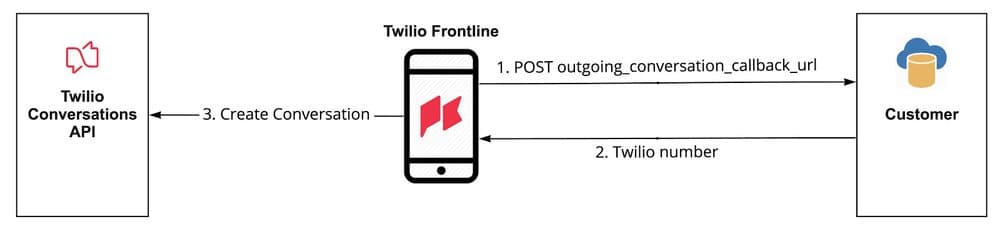
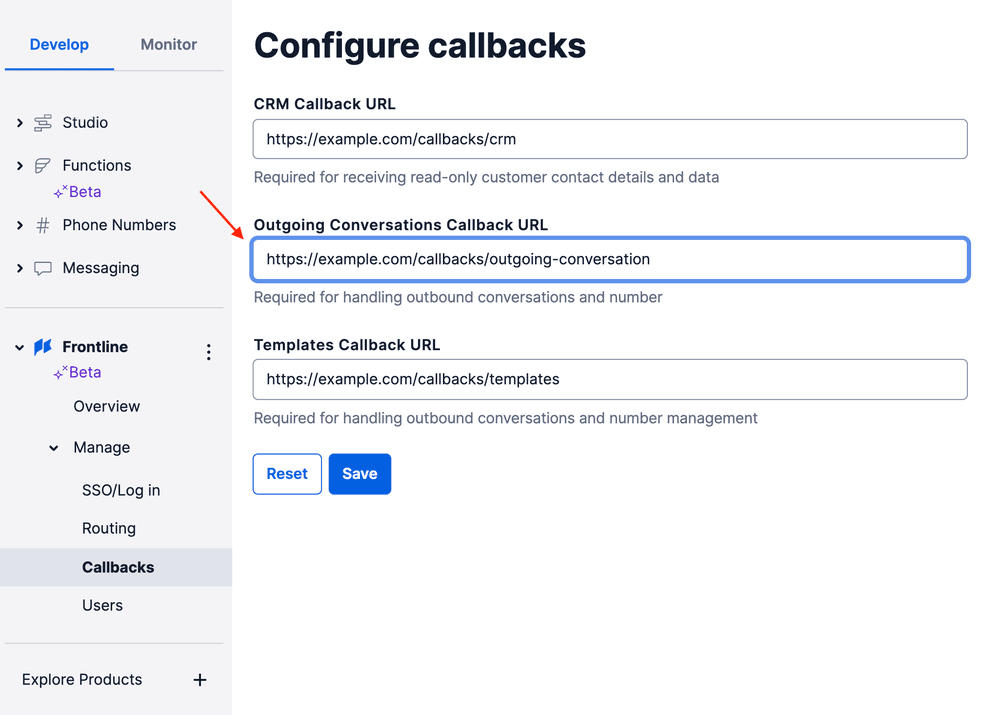
To configure it, open Frontline console and set the Outgoing Conversation Callback URL configuration option to a URL that will respond back with a proxy phone number.
When the Frontline application makes a POST HTTP request to your server, it includes information about the action that triggered the callback to your web application. Each action has its own Location type. The Location will be sent with the rest of the parameters in the request body in application/x-www-urlencoded format.
In addition to the location-specific parameters, each request also contains the following parameters and information:
| Parameter name | Type | Description |
|---|---|---|
| Location | string | A single callback URL might be used for different purposes. This parameter is meant to help to determine how to process a request |
| Worker | string | The app user identity |
Info
Frontline will send a request with Content-Type header of application/x-www-urlencoded and will expect a response with Content-Type header of application/json and a body based on the Location parameter.
The application needs to know a proxy address in order to add a customer as a participant to an outgoing conversation. See an example in src/routes/callbacks/outgoing-conversation.js file.
Request parameters:
| Parameter name | Type | Description |
|---|---|---|
| CustomerId | string | Customer ID provided by the server |
| ChannelType | string | The channel type. It can be sms, whatsapp, chat |
| ChannelValue | string | The channel address. Example: +123456789 or whatsapp:+123456789 |
Response format:
| Parameter name | Type | Description |
|---|---|---|
| proxy_address | string | A Twilio proxy number to be used in outgoing conversation |
JSON response example:
1{2"proxy_address": "+123456789"3}