# JavaScript Platform Overview
Twilio's Programmable Video JavaScript SDK lets you add real-time voice and video to your web applications. The JavaScript SDK connects to a Twilio Video Room and allows you to control the client-side video conference experience.
> \[!NOTE]
>
> Intending to write back-end JavaScript with Twilio in Node.js to support your front-end client? Check out the [Twilio Node.js SDK](https://github.com/twilio/twilio-node).
Your application also needs a back-end server to create Access Tokens that the JavaScript SDK can use to connect to a Video Room. Learn more about the [components of a Twilio Video app](/docs/video/video-app-components).
## Install the JavaScript SDK
You can include the JavaScript SDK in your application either by installing it with [Node Package Manager](https://www.npmjs.com/) (npm) or using the Twilio CDN.
See the [list of supported browsers below.](/docs/video/javascript#supported-browsers)
### Install using npm
Install the Video JavaScript SDK using npm with the following command:
```bash
npm install --save twilio-video
```
Then, you can start using the JavaScript SDK in your application by importing it:
```javascript
const Video = require('twilio-video');
```
#### Include using a script tag
You can also copy `twilio-video.min.js` from the `twilio-video/dist` folder after npm installing it and include it directly in your web app using a `
```
Using this method, you can access the JavaScript SDK through the `Twilio.Video` browser global:
```javascript
const Video = Twilio.Video;
```
### Install from the Twilio CDN
You can also include the JavaScript SDK in your application from Twilio's CDN with the following script tag:
```html
```
You can access the JavaScript SDK through the `Twilio.Video` browser global:
```javascript
const Video = Twilio.Video;
```
> \[!NOTE]
>
> Use the latest Twilio Video JavaScript SDK release. To find the CDN link for the most recent JavaScript SDK release, visit the [JavaScript SDK latest release documentation](https://sdk.twilio.com/js/video/latest/docs#toc5__anchor).
## Supported browsers
The JavaScript Video library requires recent versions of Chrome, Safari, Firefox, or Edge (Chromium).
The following table shows which browsers are supported on each operating system:
| | Chrome | Firefox | Safari | Edge (Chromium) | WebView |
| ----------- | ------ | ------- | ------ | --------------- | ------- |
| **Android** | ✓ | ✓ | - | - | - |
| **iOS** | ✓ | - | ✓ | ✓ | ✓ |
| **Linux** | ✓ | ✓ | - | - | - |
| **macOS** | ✓ | ✓ | ✓ | ✓ | - |
| **Windows** | ✓ | ✓ | - | ✓ | - |
> \[!WARNING]
>
> Some [MediaTrackConstraints](https://developer.mozilla.org/en-US/docs/Web/API/MediaTrackConstraints#browser_compatibility) are not supported by Safari.
You can check if a user's browser is supported using the `isSupported` flag in your application:
```javascript
// import twilio-video, if you've used npm to install the SDK
const { isSupported } = require('twilio-video');
// if you are using the SDK via a script tag or the CDN, you would
// access isSupported as follows:
// const isSupported = Twilio.Video.isSupported;
if (isSupported) {
// Set up your video application...
} else {
console.error('This browser is not supported by twilio-video.js.');
}
```
### WebView support on iOS
WebView is supported on iOS 14.3 or later starting with JS SDK version 2.21.0.
twilio-video.js now supports WKWebView and SFSafariViewController on iOS version 14.3 or later. The flag [`isSupported`](https://sdk.twilio.com/js/video/releases/2.34.0/docs/module-twilio-video.html) relies partly on the [`User-Agent` string](https://developer.mozilla.org/en-US/docs/Web/HTTP/Headers/User-Agent) to determine if twilio-video.js officially supports the user's browser. If your application modifies the default value for the `User-Agent` string, the new value should follow the [correct format](https://developer.mozilla.org/en-US/docs/Web/HTTP/Headers/User-Agent#syntax). For [iOS applications](https://developer.apple.com/documentation/avfoundation/cameras_and_media_capture/requesting_authorization_for_media_capture_on_ios), your application will need to include the [camera usage description](https://developer.apple.com/library/archive/documentation/General/Reference/InfoPlistKeyReference/Articles/CocoaKeys.html#//apple_ref/doc/plist/info/NSCameraUsageDescription), [microphone usage description](https://developer.apple.com/library/archive/documentation/General/Reference/InfoPlistKeyReference/Articles/CocoaKeys.html#//apple_ref/doc/uid/TP40009251-SW25), and [inline media playback](https://developer.apple.com/documentation/webkit/wkwebviewconfiguration/1614793-allowsinlinemediaplayback) for the SDK to work on WKWebView.
> \[!WARNING]
>
> There are some [common issues](https://github.com/twilio/twilio-video.js/blob/master/COMMON_ISSUES.md#safari-mobile) such as interruptions on mobile devices from backgrounding the application or switching between applications. These can sometimes cause `VideoTracks` to go black or `AudioTracks` to stop.
### WebView support on Android
Android WebView is not currently supported by the JS SDK and the flag [`isSupported`](https://sdk.twilio.com/js/video/releases/2.34.0/docs/module-twilio-video.html) will return `false` if you use the JS SDK on Android WebView.
## Resources for getting started
There are many resources you can explore when starting to build your first Twilio Video applications with the JavaScript SDK. You can follow tutorials, read documentation, or deploy pre-built sample video applications.
### Tutorials
The following tutorials show you how to build an application from the ground up using the JavaScript SDK:
* [Twilio Video webinar](/docs/video/webinar): A recording of a Twilio Video webinar, which introduces Twilio Video and walks through building a sample video chat application with Python and the JavaScript SDK.
* Get started with Twilio Video using the JavaScript SDK. The following tutorials use different programming languages and frameworks for the Access Token server:
* [Python and Flask](/docs/video/tutorials/get-started-with-twilio-video-python-flask-server)
* [Node.js and Express](/docs/video/tutorials/get-started-with-twilio-video-node-express-server)
* [Ruby and Sinatra](https://www.twilio.com/blog/build-video-chat-ruby-javascript-twilio-programmable-video)
* [PHP and Symfony](https://www.twilio.com/blog/create-group-video-chat-app-symfony-php-twilio-react)
* [C#/.NET and Blazor WebAssembly](https://www.twilio.com/blog/build-video-chat-app-asp-net-core-angular-11-twilio-programmable-video) (uses AngularJS)
* [Serverless with Twilio Functions](https://www.twilio.com/blog/serverless-video-chat-application-javascript-twilio-programmable-video) (uses Twilio Functions to host your application and token server)
### Blog posts
Twilio's Blog has many posts about building applications with Twilio Video. You can explore different Twilio features and see examples using a variety of languages and frameworks.
To find all Video blog posts, [filter posts for the "Video" tag](https://www.twilio.com/blog). You can also find translated blog posts on the Twilio Blog.
### Quickstart
Build a basic video application with the JavaScript SDK:
* [Twilio Video Quickstart for JavaScript](/docs/video/javascript-getting-started)
### Code Exchange
Twilio's Code Exchange is a repository of code samples for common Twilio use cases:
* [Basic JavaScript SDK Video Chat application](https://www.twilio.com/code-exchange/basic-video-chat) (this is one-click deployable, no local setup required)
* [List of all Code Exchange Video applications](https://www.twilio.com/code-exchange?q=\&f=video)
### Quickstart application
Quickstart applications are minimal Twilio Video applications that demonstrate the basics of working with Twilio Video:
* [JavaScript Quickstart application](https://github.com/twilio/video-quickstart-js)
### Quick Deploy application
Quick Deploy applications are more full-featured than the Quickstart applications. They demonstrate a wide variety of Twilio Video functionality and can be used to quickly get started with a robust set of Video tools:
* [React Quick Deploy application](https://github.com/twilio/twilio-video-app-react)
### CodeSandbox
Try out and experiment with [a basic CodeSandbox](https://codesandbox.io/s/twilio-video-demo-gcj03?file=/main.js) that uses the Twilio Video JavaScript SDK to display a local user's video.
## Best practices
[View recommendations and best practices](/docs/video/build-js-video-application-recommendations-and-best-practices) for building applications using the Programmable Video JavaScript SDK.
## Troubleshooting and diagnostic tools
Twilio has tools for understanding, troubleshooting, and enhancing your Twilio Video applications throughout the development lifecycle. You can use these tools to perform pre-call quality checks, as well as to gain insight into your application's performance and participants' experiences during or after a video call.
### Video Diagnostics Application
The [Twilio Video Diagnostics Application](https://github.com/twilio/twilio-video-diagnostics-react-app) is an open-source ReactJS application that tests participants' device and software setup, connectivity with the Twilio Cloud, and network performance. It uses Twilio's [RTC Diagnostics SDK](/docs/video/troubleshooting#rtc-diagnostics-sdk) and [Preflight API](#preflight-api) to provide end-users with feedback about their network quality and device setup and also includes recommendations for improving their video call quality.
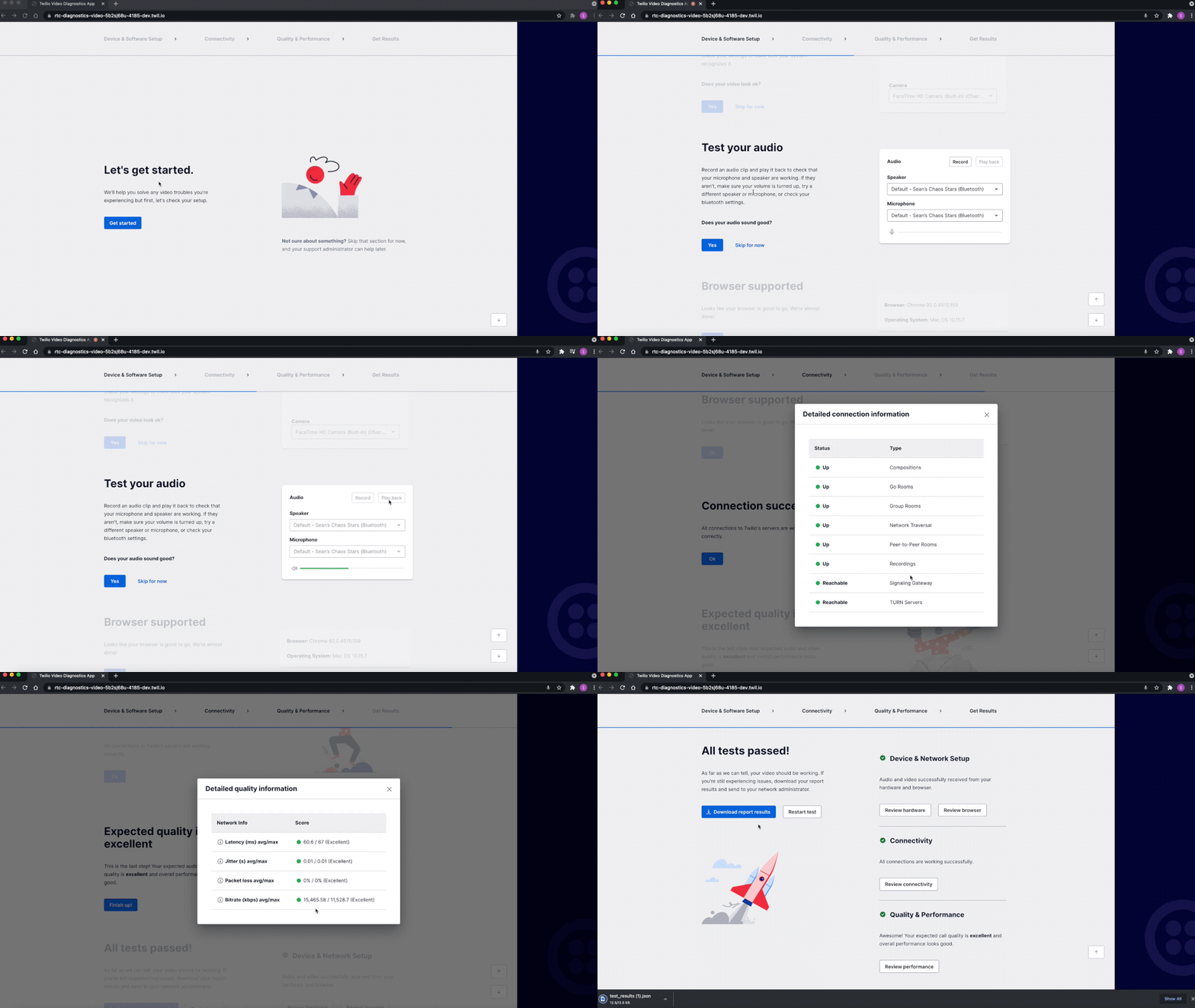
Learn more about the [JavaScript Video diagnostics application](/docs/video/troubleshooting/pre-call-testing-and-diagnostics#video-diagnostics-application).
The [RTC Diagnostics SDK](/docs/video/troubleshooting#rtc-diagnostics-sdk) and [Preflight API](#preflight-api) can also be used independently in your application to test your participants' device setup and network connectivity.
### RTC Diagnostics SDK
Twilio's [RTC Diagnostics SDK](https://github.com/twilio/rtc-diagnostics) for JavaScript applications provides functions to test a participant's input and output devices, including microphones, speakers, and cameras. It also includes functionality to confirm that a participant meets the network bandwidth requirements required to make a voice call or conduct a video call.
This is a general WebRTC SDK and does not rely on Twilio infrastructure. You can incorporate it into your applications for pre-call testing or troubleshooting user issues during a call.
### Preflight API
The [Preflight API](/docs/video/troubleshooting/preflight-api) provides functions for testing connectivity to the Twilio Cloud. The API can identify signaling and media connectivity issues and provide a report at the end of the test.
### JavaScript Room Monitor
Twilio's [JavaScript Room Monitor](https://www.twilio.com/blog/video-js-room-monitor) is a browser-based tool that displays real-time information and metrics about a Twilio Video Room. It gathers and processes information from the Room object, including information about Participants' bandwidth, packet loss, and jitter, and displays the information in a modal window in the video application.
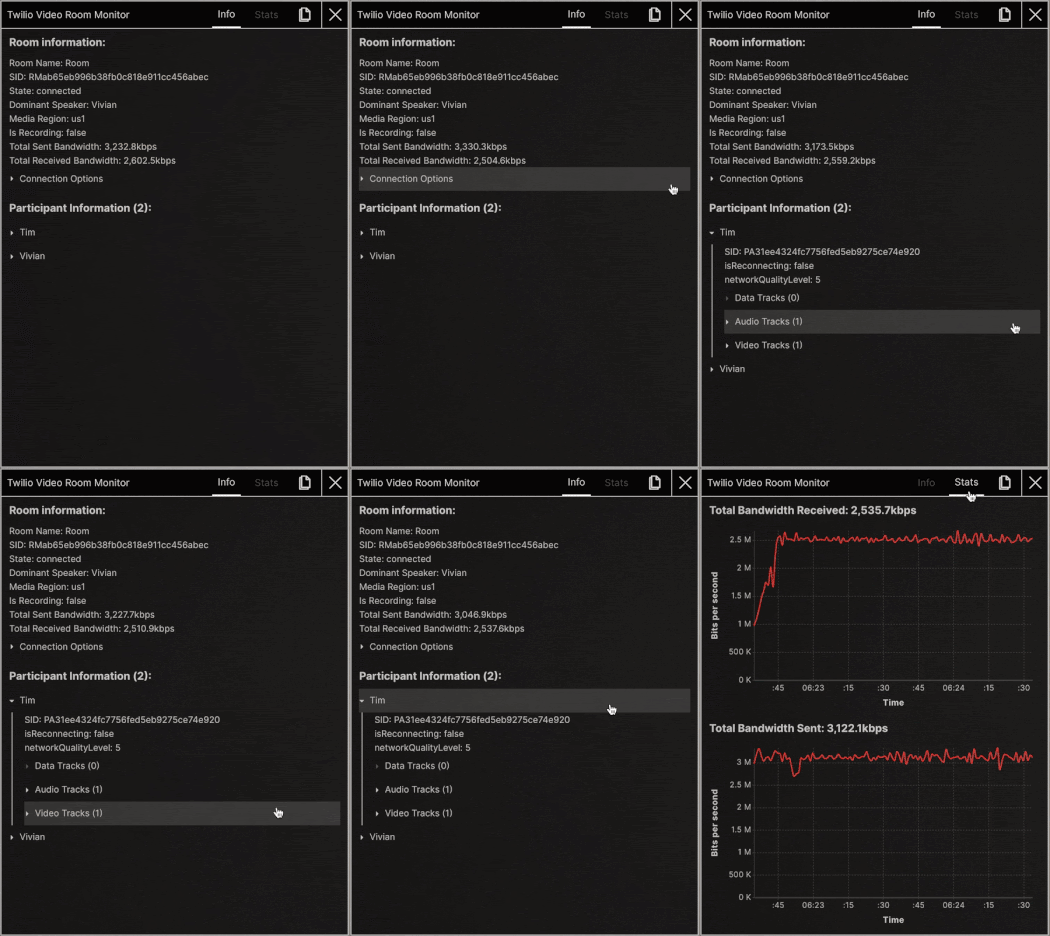
The JavaScript Room Monitor can be added to any Twilio Video JavaScript application to help during all stages of development and/or for debugging in-progress calls.
### JavaScript Logger
The [JavaScript Logger](/docs/video/troubleshooting/javascript-logger) allows you to capture logs generated by the Twilio Video JS SDK in real-time so that you can monitor your frontend applications and see how they behave in production.
## Video Processors
[Twilio Video Processors](/docs/video/video-processors) is a collection of tools for applying transformations and filters, such as blurred backgrounds and virtual backgrounds, to Twilio `VideoTracks`.
See a [live demo with blurred backgrounds and virtual backgrounds](https://twilio.github.io/twilio-video-processors.js/examples/virtualbackground/) using the Video Processors tools.
## SDK documentation
The Twilio Video JavaScript SDK has [autogenerated documentation](https://sdk.twilio.com/js/video/latest/docs/) for all classes and methods in the SDK.