# Toll-Free Verification Compliance Embeddable Onboarding Guide
> \[!NOTE]
>
> Access to the Compliance Embeddable API requires prior registration. Request access using the
>
> [Compliance Embeddable API access form.](https://docs.google.com/forms/d/e/1FAIpQLSeytZ071ZGjNk8yXSnze5An7PHxDRQYj2zUzXSymYIzaUFxEQ/viewform?usp=sf_link)
## Overview
The Compliance Embeddable is a white-label embed offering designed to seamlessly integrate into an Independent Software Vendor's (ISV) existing portal or web application. Your team can use this embed to allow your end customers to submit toll-free verification requests through self-service. Twilio manages the questions in the UI, but there is no Twilio branding visible. Your team can customize the UI to match your design standards, including color palette and typeface.
The TFV Compliance Embeddable supports your end customers to resume incomplete verification submissions, and previously rejected verifications can be edited and resubmitted directly within the embeddable experience. This eliminates the need for manual intervention through the API or Console when handling rejected submissions. Additionally, parameters included in the upcoming Feb 17th program policy changes around Business Registration Number and CampaignVerify Token for Political messaging are supported.
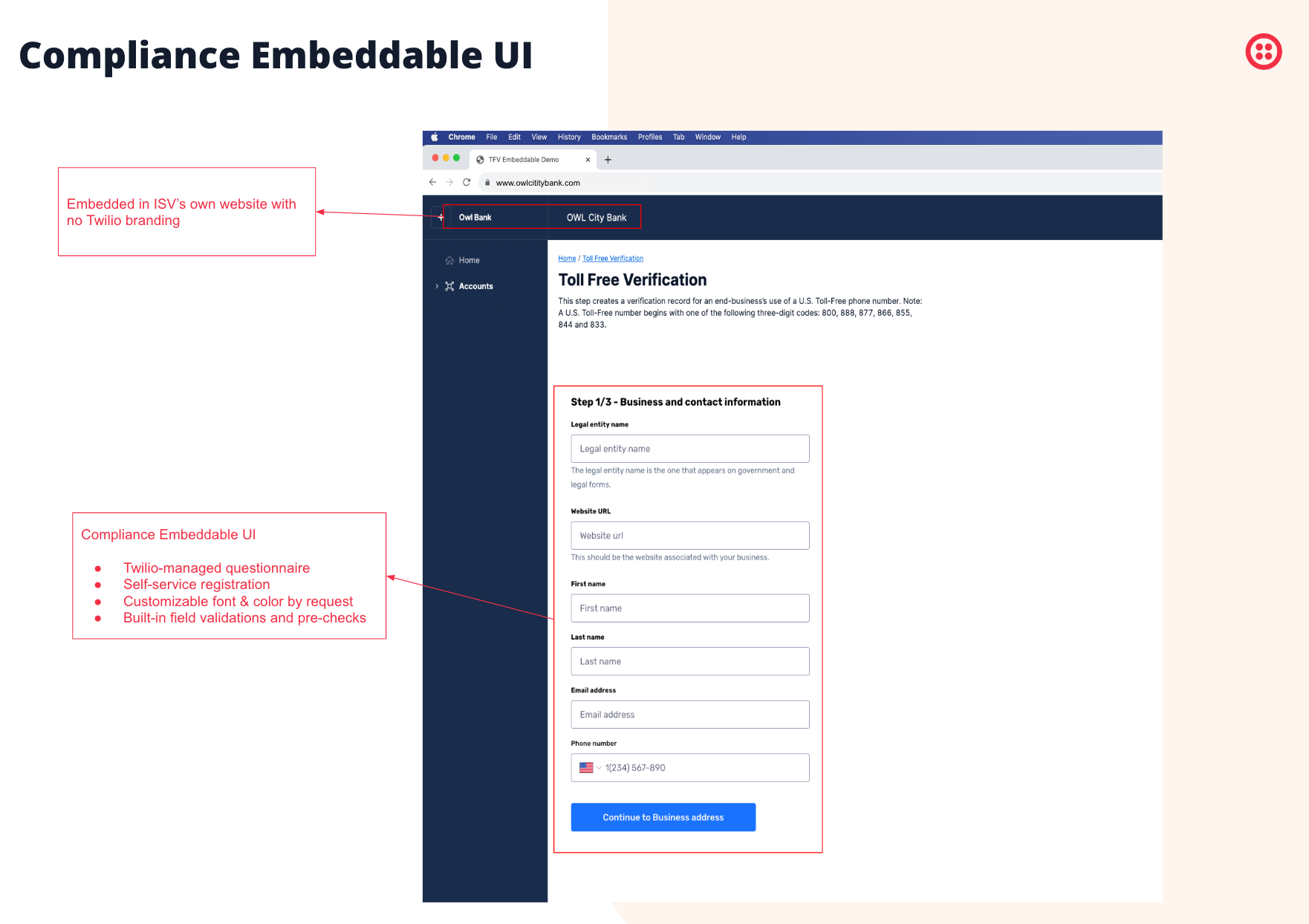
The Compliance Embeddable requires two integrations:
1. **Server-side** integration to invoke the Twilio Initialize ComplianceInquiry APIs to initialize the ComplianceInquiry and get back a session token and inquiry ID.
2. **Client-side** integration to embed the ComplianceInquiry UI in your existing web application using an iframe, utilizing the returned session token and inquiry ID.
This onboarding guide provides a step-by-step walkthrough on how to integrate the Compliance Embeddable into an ISV's web application, allowing self-service Toll-Free Verification for your end customers.
* [Server-side integration](#server-side-integration)
* [Client-side integration](#client-side-integration)
If you have questions about this product, check out the [Compliance Embeddable FAQ](https://help.twilio.com/articles/31769870199707-What-is-the-Compliance-Embeddable) or contact us at via the [Twilio Help Center.](https://help.twilio.com/)
## Prerequisite
To follow these steps, you must have a Trust Hub Primary Customer Profile for a business with the business identity set to ISV/Reseller. See [Create a Trust Hub Primary Customer Profile](/docs/messaging/compliance/toll-free/api-onboarding#create-a-trust-hub-primary-customer-profile) to learn more.
## Server-side integration
The Compliance Embeddable's data collection process is secured via server-side authentication and is triggered by a server-side API call. This API call initializes a ComplianceInquiry and returns a token, which you can then pass to your web client to authenticate into a submission flow.
### Initialize ComplianceInquiry API for Toll-Free Verification
To initialize a ComplianceInquiry for a Toll-Free Verification, make an HTTPS request to the following API:
**`POST`** `https://trusthub.twilio.com/v1/ComplianceInquiries/Tollfree/Initialize`
This call must be authenticated using [Twilio's REST API credentials](/docs/iam/credentials/api) where the account SID is either your primary Twilio Account SID or a subaccount SID. All of the parameters except for `TollfreePhoneNumber` and `NotificationEmail` are optional. If this data is provided, it will automatically appear pre-filled in the subsequent forms in the user's UI.
> \[!NOTE]
>
> The Account SID given in the credentials is the Account that the Toll-Free Verification will be associated with after completion of the ComplianceInquiry.
## Resume and resubmission behavior
The Initialize API supports both new submissions and resumption of existing inquiries. When you call the API for a toll-free number with an existing incomplete or rejected inquiry, the API returns the same `inquiry_id` with a new `inquiry_session_token`. Previously entered data is retained and pre-populated in the form.
For rejected verifications eligible for resubmission, calling the Initialize API allows your end customer to edit their submission and correct any issues. The embeddable displays the previous data, enabling targeted corrections rather than requiring complete re-entry.
If a verification is already in progress, approved, or rejected with an error that cannot be resubmitted, the API returns an error response. See the Error responses table for details.
#### Request Parameters
Add the following `--data-urlencode` parameters to the request body:
| Parameter | Field type | Description |
| ------------------------------------------- | -------------- | ------------------------------------------------------------------------------------------------------------------------------------------------------------------------------------------------------------------------------------------------------------------------------------------------------------------------------------------------------------------------------------------------------------------ |
| TollfreePhoneNumber \[required] | String | The Toll-Free number, in E.164 format, for which the verification request needs to be submitted. |
| NotificationEmail \[required] | String | The email ID to which all notifications for the status of Toll-Free Verification will be sent. |
| ThemeSetId \[optional] | String | Theme ID for the UI. Relevant for customers who've requested customized font or color. To request a customized Theme, follow the instructions in the [FAQ](https://help.twilio.com/articles/31769870199707-What-is-the-Compliance-Embeddable#h_01JES8BV1NGC17T3QQBVS9Q6PD). |
| BusinessName \[optional] | String | The name of the business or organization using the Toll-Free phone number. |
| BusinessStreetAddress \[optional] | String | The address of the business or organization using the Toll-Free phone number. |
| BusinessStreetAddress2 \[optional] | String | The second row of the street address of the business or organization using the Toll-Free phone number. |
| BusinessCity \[optional] | String | The city of the business or organization using the Toll-Free phone number. |
| BusinessStateProvinceRegion \[optional] | String | The state/province or region of the business or organization using the Toll-Free phone number. |
| BusinessPostalCode \[optional] | String | The postal code of the business or organization using the Toll-Free phone number. |
| BusinessCountry \[optional] | String | The ISO country code of the business or organization using the Toll-Free phone number. |
| BusinessWebsite \[optional] | String | The website of the business or organization using the Toll-Free phone number. |
| BusinessContactFirstName \[optional] | String | The first name of the contact for the business or organization using the Toll-Free phone number. |
| BusinessContactLastName \[optional] | String | The last name of the contact for the business or organization using the Toll-Free phone number. |
| BusinessContactEmail \[optional] | String | The email address of the contact for the business or organization using the Toll-Free phone number. |
| BusinessContactPhone \[optional] | String | The phone number of the contact for the business or organization using the Toll-Free phone number. |
| UseCaseCategories \[optional] | Array (String) | Choose the use case that you believe best fits your customer's traffic pattern. This should be the use case that best fits the types of messages being sent by this Toll-Free phone number. |
| UseCaseSummary \[optional] | String | The explanation on how messaging is used by the business or organization. |
| ProductionMessageSample \[optional] | String | An example of the message content, e.g., "This is Chris, I'm here with your order. Reply STOP to opt out." |
| OptInImageUrls \[optional] | Array (String) | Link to an image or document that shows the opt-in workflow where your users sign up for your SMS campaign. Multiple URLs are allowed. Any URL submitted must be reachable, resolvable, and accessible to the public. |
| OptInType \[optional] | String | Describes how a user opts in to text messages. |
| MessageVolume \[optional] | String | The monthly volume estimation of messages from the Toll-Free number. |
| DoingBusinessAs \[optional] | String | Trade name, sub-entity, or downstream business name if different from the registered business name. |
| BusinessType \[optional] | String | The type of business entity. Valid values are `PRIVATE_PROFIT`, `PUBLIC_PROFIT`, `NON_PROFIT`, `SOLE_PROPRIETOR`, and `GOVERNMENT`. |
| BusinessRegistrationNumber \[optional] | String | A legally recognized business registration number such as an EIN. Required for all business types except `SOLE_PROPRIETOR`. |
| BusinessRegistrationAuthority \[optional] | String | The authority that issued the business registration. For US businesses, this is typically `EIN`. Required for all business types except `SOLE_PROPRIETOR`. |
| BusinessRegistrationCountry \[optional] | String | The ISO country code where the business is registered. Required for all business types except `SOLE_PROPRIETOR`. |
| BusinessRegistrationPhoneNumber \[optional] | String | The phone number associated with the business registration in E.164 format. |
| OptInConfirmationMessage \[optional] | String | The confirmation message sent to users when they opt in to receive messages. |
| OptInKeywords \[optional] | Array (String) | Keywords that users can text to opt in, such as `START` or `YES`. |
| HelpMessageSample \[optional] | String | A sample help response provided to users who text HELP. |
| PrivacyPolicyUrl \[optional] | String | The URL to the business privacy policy. |
| TermsAndConditionsUrl \[optional] | String | The URL to the business terms and conditions. |
| AgeGatedContent \[optional] | Boolean | Set to `true` if the messaging content is age-restricted. |
| VettingProvider \[optional] | String | The vetting provider used for enhanced verification. Currently supports `CAMPAIGN_VERIFY`. |
| VettingId \[optional] | String | The unique vetting token from the vetting provider. The token is case-sensitive and must match the format provided by the vetting provider exactly. |
| AdditionalInformation \[optional] | String | Additional info to help with the verification. |
| SkipMessagingUseCase \[optional] | Boolean | Send this as `true` if you wish to skip the messaging use case screen in the UI, which asks the user to provide "UseCaseCategories", "UseCaseSummary", "ProductionMessageSample", "OptInImageUrls", "OptInType", "MessageVolume". Requests to hide will only be honored if "UseCaseCategories", "UseCaseSummary", "ProductionMessageSample", "OptInImageUrls", "OptInType", and "MessageVolume" are pre-populated. |
> **Note:** Data validations will be performed on these fields. Refer to our [Toll-Free Verification Guide](/docs/messaging/compliance/toll-free/api-onboarding#option-21-a-customer-profile-sid-is-not-provided) for detailed validation rules. Additionally, you may sign up for status change notifications for Toll-Free Verification via [Twilio Event Streams](/docs/messaging/compliance/toll-free/api-onboarding#learning-the-status-of-your-toll-free-verification-submission).
Initialize ComplianceInquiry API for Toll-Free Verification
```js
// Download the helper library from https://www.twilio.com/docs/node/install
const twilio = require("twilio"); // Or, for ESM: import twilio from "twilio";
// Find your Account SID and Auth Token at twilio.com/console
// and set the environment variables. See http://twil.io/secure
const accountSid = process.env.TWILIO_ACCOUNT_SID;
const authToken = process.env.TWILIO_AUTH_TOKEN;
const client = twilio(accountSid, authToken);
async function createComplianceTollfreeInquiry() {
const complianceTollfreeInquiry =
await client.trusthub.v1.complianceTollfreeInquiries.create({
businessName: "Twilio",
businessRegistrationAuthority: "EIN",
businessRegistrationCountry: "US",
businessRegistrationNumber: "12-3456789",
businessType: "PRIVATE_PROFIT",
businessWebsite: "https://www.twilio.com",
notificationEmail: "dean@twilio.com",
tollfreePhoneNumber: "+800445566",
});
console.log(complianceTollfreeInquiry.inquiryId);
}
createComplianceTollfreeInquiry();
```
```python
# Download the helper library from https://www.twilio.com/docs/python/install
import os
from twilio.rest import Client
# Find your Account SID and Auth Token at twilio.com/console
# and set the environment variables. See http://twil.io/secure
account_sid = os.environ["TWILIO_ACCOUNT_SID"]
auth_token = os.environ["TWILIO_AUTH_TOKEN"]
client = Client(account_sid, auth_token)
compliance_tollfree_inquiry = (
client.trusthub.v1.compliance_tollfree_inquiries.create(
tollfree_phone_number="+800445566",
notification_email="dean@twilio.com",
business_name="Twilio",
business_website="https://www.twilio.com",
business_registration_number="12-3456789",
business_registration_authority="EIN",
business_registration_country="US",
business_type="PRIVATE_PROFIT",
)
)
print(compliance_tollfree_inquiry.inquiry_id)
```
```csharp
// Install the C# / .NET helper library from twilio.com/docs/csharp/install
using System;
using Twilio;
using Twilio.Rest.Trusthub.V1;
using System.Threading.Tasks;
class Program {
public static async Task Main(string[] args) {
// Find your Account SID and Auth Token at twilio.com/console
// and set the environment variables. See http://twil.io/secure
string accountSid = Environment.GetEnvironmentVariable("TWILIO_ACCOUNT_SID");
string authToken = Environment.GetEnvironmentVariable("TWILIO_AUTH_TOKEN");
TwilioClient.Init(accountSid, authToken);
var complianceTollfreeInquiries = await ComplianceTollfreeInquiriesResource.CreateAsync(
tollfreePhoneNumber: new Twilio.Types.PhoneNumber("+800445566"),
notificationEmail: "dean@twilio.com",
businessName: "Twilio",
businessWebsite: "https://www.twilio.com",
businessRegistrationNumber: "12-3456789",
businessRegistrationAuthority: "EIN",
businessRegistrationCountry: "US",
businessType: ComplianceTollfreeInquiriesResource.BusinessTypeEnum.PrivateProfit);
Console.WriteLine(complianceTollfreeInquiries.InquiryId);
}
}
```
```java
// Install the Java helper library from twilio.com/docs/java/install
import com.twilio.type.PhoneNumber;
import com.twilio.Twilio;
import com.twilio.rest.trusthub.v1.ComplianceTollfreeInquiries;
public class Example {
// Find your Account SID and Auth Token at twilio.com/console
// and set the environment variables. See http://twil.io/secure
public static final String ACCOUNT_SID = System.getenv("TWILIO_ACCOUNT_SID");
public static final String AUTH_TOKEN = System.getenv("TWILIO_AUTH_TOKEN");
public static void main(String[] args) {
Twilio.init(ACCOUNT_SID, AUTH_TOKEN);
ComplianceTollfreeInquiries complianceTollfreeInquiries =
ComplianceTollfreeInquiries.creator(new com.twilio.type.PhoneNumber("+800445566"), "dean@twilio.com")
.setBusinessName("Twilio")
.setBusinessWebsite("https://www.twilio.com")
.setBusinessRegistrationNumber("12-3456789")
.setBusinessRegistrationAuthority("EIN")
.setBusinessRegistrationCountry("US")
.setBusinessType(ComplianceTollfreeInquiries.BusinessType.PRIVATE_PROFIT)
.create();
System.out.println(complianceTollfreeInquiries.getInquiryId());
}
}
```
```go
// Download the helper library from https://www.twilio.com/docs/go/install
package main
import (
"fmt"
"github.com/twilio/twilio-go"
trusthub "github.com/twilio/twilio-go/rest/trusthub/v1"
"os"
)
func main() {
// Find your Account SID and Auth Token at twilio.com/console
// and set the environment variables. See http://twil.io/secure
// Make sure TWILIO_ACCOUNT_SID and TWILIO_AUTH_TOKEN exists in your environment
client := twilio.NewRestClient()
params := &trusthub.CreateComplianceTollfreeInquiryParams{}
params.SetTollfreePhoneNumber("+800445566")
params.SetNotificationEmail("dean@twilio.com")
params.SetBusinessName("Twilio")
params.SetBusinessWebsite("https://www.twilio.com")
params.SetBusinessRegistrationNumber("12-3456789")
params.SetBusinessRegistrationAuthority("EIN")
params.SetBusinessRegistrationCountry("US")
params.SetBusinessType("PRIVATE_PROFIT")
resp, err := client.TrusthubV1.CreateComplianceTollfreeInquiry(params)
if err != nil {
fmt.Println(err.Error())
os.Exit(1)
} else {
if resp.InquiryId != nil {
fmt.Println(*resp.InquiryId)
} else {
fmt.Println(resp.InquiryId)
}
}
}
```
```php
trusthub->v1->complianceTollfreeInquiries->create(
"+800445566", // TollfreePhoneNumber
"dean@twilio.com", // NotificationEmail
[
"businessName" => "Twilio",
"businessWebsite" => "https://www.twilio.com",
"businessRegistrationNumber" => "12-3456789",
"businessRegistrationAuthority" => "EIN",
"businessRegistrationCountry" => "US",
"businessType" => "PRIVATE_PROFIT",
]
);
print $compliance_tollfree_inquiry->inquiryId;
```
```ruby
# Download the helper library from https://www.twilio.com/docs/ruby/install
require 'twilio-ruby'
# Find your Account SID and Auth Token at twilio.com/console
# and set the environment variables. See http://twil.io/secure
account_sid = ENV['TWILIO_ACCOUNT_SID']
auth_token = ENV['TWILIO_AUTH_TOKEN']
@client = Twilio::REST::Client.new(account_sid, auth_token)
compliance_tollfree_inquiry = @client
.trusthub
.v1
.compliance_tollfree_inquiries
.create(
tollfree_phone_number: '+800445566',
notification_email: 'dean@twilio.com',
business_name: 'Twilio',
business_website: 'https://www.twilio.com',
business_registration_number: '12-3456789',
business_registration_authority: 'EIN',
business_registration_country: 'US',
business_type: 'PRIVATE_PROFIT'
)
puts compliance_tollfree_inquiry.inquiry_id
```
```bash
# Install the twilio-cli from https://twil.io/cli
twilio api:trusthub:v1:compliance-inquiries:tollfree:initialize:create \
--tollfree-phone-number +800445566 \
--notification-email dean@twilio.com \
--business-name Twilio \
--business-website https://www.twilio.com \
--business-registration-number 12-3456789 \
--business-registration-authority EIN \
--business-registration-country US \
--business-type PRIVATE_PROFIT
```
```bash
curl -X POST "https://trusthub.twilio.com/v1/ComplianceInquiries/Tollfree/Initialize" \
--data-urlencode "TollfreePhoneNumber=+800445566" \
--data-urlencode "NotificationEmail=dean@twilio.com" \
--data-urlencode "BusinessName=Twilio" \
--data-urlencode "BusinessWebsite=https://www.twilio.com" \
--data-urlencode "BusinessRegistrationNumber=12-3456789" \
--data-urlencode "BusinessRegistrationAuthority=EIN" \
--data-urlencode "BusinessRegistrationCountry=US" \
--data-urlencode "BusinessType=PRIVATE_PROFIT" \
-u $TWILIO_ACCOUNT_SID:$TWILIO_AUTH_TOKEN
```
```json
{
"inquiry_id": "inq_aaaaaaaaaaaaaaaaaaaaaaaa",
"inquiry_session_token": "new.session.token",
"registration_id": "tri1.us1.trusthub.ACaaaaaaaaaaaaaaaaaaaaaaaaaaaaaaaa.tollfree.PNaaaaaaaaaaaaaaaaaaaaaaaaaaaaaaaa",
"url": "https://trusthub.twilio.com/v1/ComplianceInquiries/Tollfree/Initialize"
}
```
A successful request will return a JSON response body with the following attributes:
| Name | Description |
| ----------------------- | -------------------------------------------------------------------------------------------------------------------------------------------------------------------- |
| registration\_id | A reference for your Toll-free verification resource in Twilio. |
| inquiry\_id | A reference for your Toll-free verification Inquiry in Twilio. This value will be used to initialize the client component. |
| inquiry\_session\_token | An ephemeral session token for your Compliance Inquiry in Twilio. This value will be used to initialize the client component. Expires in 1440 minutes from creation. |
API Error Responses and their meaning
| Error | Error Code | Error Message |
| -------------------------------------------------------------------------------------------------------------------------------------------------------------------------------------------------- | ---------- | ------------------------------------------------------------- |
| PN not provided | 400 | Phone number is required. |
| Notification email not provided | 400 | Notification email is required. |
| PN entered doesn't belong to the ISV account | 400 | Phone number doesn't belong to this ISV account. |
| PN entered is not a Toll-free number | 400 | Phone number is not a Toll-free number. |
| Verification is not eligible for re-submission i.e. is already in progress or rejected with a non-resubmittable error. | 400 | Verification for `Number` is not eligible for re-submission. |
| Account is a trial account | 400 | Trial account: `AccountSid` cannot be used for this operation |
| PN status is not "in-use" | 400 | Phone number is not valid. |
| This is a generic error. A common reason for this error is when you've reached the session limit. For a single inquiry\_id, there's a limit that you can generate max 50 inquiry\_session\_tokens. | 500 | Internal Server Error |
##### Use case categories
Valid values for the `UseCaseCategories` parameter include:
* `TWO_FACTOR_AUTHENTICATION`
* `ACCOUNT_NOTIFICATIONS`
* `CUSTOMER_CARE`
* `DELIVERY_NOTIFICATIONS`
* `FRAUD_ALERT_MESSAGING`
* `HIGHER_EDUCATION`
* `MARKETING`
* `POLLING_AND_VOTING`
* `PUBLIC_SERVICE_ANNOUNCEMENT`
* `SECURITY_ALERT`
* `POLITICAL_ELECTION_CAMPAIGNS`
Multiple categories can be provided if applicable to your use case.
## Client-side integration
After initializing a ComplianceInquiry, you may embed the ComplianceInquiry UI in your website using the `TwilioComplianceEmbed` React client.
### Installation
Install the package in your React project using your preferred package manager.
**NPM:**
```bash
npm install @twilio/twilio-compliance-embed
```
**Yarn:**
```bash
yarn add @twilio/twilio-compliance-embed
```
### Usage
#### React
The ComplianceInquiry UI can be embedded into your site with the following code snippet:
```jsx
import * as React from "react";
import { TwilioComplianceEmbed } from "@twilio/twilio-compliance-embed";
const ComplianceInquiry = () => {
return (
);
};
```
The ComplianceInquiry UI may take a few seconds to load and render.
### Props
| Name | Type | Description |
| ------------------- | ------------------------------------------------------------------ | ---------------------------------------------------------------------------------------------------------------------------------------------------------------------------------------------------------------------------------------------------------------------------------------------------------------------------------------------------------------------------------------------------------------------------------------------------- |
| inquiryId | (Required) String | A valid inquiryId returned by calling the Initialize ComplianceInquiry API |
| inquirySessionToken | (Required) String | A valid inquirySessionToken returned by calling the Initialize ComplianceInquiry API |
| onInquirySubmitted | () => void | An event handler that fires when the user has completed the ComplianceInquiry process. This event is fired when the user lands on the last screen |
| onComplete | () => void | An event handler that fires when the user has completed the ComplianceInquiry process. This event is fired when the user clicks the \*\*Done\*\* or \*\*Exit\*\* button on the last page.
This event is not guaranteed to be fired as the user could choose not to click the button on the last page. If you wish to track when a user has finished the flow and submitted the bundle, use onInquirySubmitted instead.
|
| onCancel | () => void | An event handler that fires when the user has canceled the ComplianceInquiry process |
| onError | () => void | An event handler that fires when an unexpected error occurs during the ComplianceInquiry process |
| onReady | () => void | An event handler that fires when the ComplianceInquiry UI has finished loading |
| widgetPadding | \{ top?: number; bottom?: number; left?: number; right?: number; } | Allows customizing the internal padding inside the iframe. If this is not passed it will use the default values \{top: 74, left: 24, right: 24, bottom: 24} Value should be an object with shape \{top?: number; bottom?: number; left?: number; right?: number;} |
### Sample usage
```jsx
import * as React from "react";
import { Spinner } from "@twilio-paste/core/spinner";
import { TwilioComplianceEmbed } from "@twilio/twilio-compliance-embed";
function MyComplianceInquiry() {
const [data, setData] = React.useState(null);
const [isLoading, setLoading] = React.useState(true);
React.useEffect(() => {
fetch("https://trusthub.twilio.com/v1/ComplianceInquiries/Tollfree/Initialize", {
method: "POST",
})
.then((res) => res.json())
.then((data) => {
setData(data);
setLoading(false);
});
}, []);
return !isLoading ? (
{
console.log("Ready!");
}}
onInquirySubmitted={() => {
console.log("Registration complete");
}}
widgetPadding={{top: 0, left: 100, right: 100, bottom: 0}}
/>
) : (
);
}
export default MyComplianceInquiry;
```
### Other frameworks
We currently do not provide native support for integrations with frontend frameworks other than React. However, we are releasing a hosted version of this product soon, so customers using non-React frameworks or older versions of React can also use the Compliance Embeddable. Check back on this page for more details in the coming months.
## Frequently asked questions
**How long does the session token last?**
The `inquiry_session_token` expires 1440 minutes (24 hours) after creation. If the token expires, call the Initialize API again to get a new token. The `inquiry_id` remains the same for existing inquiries.
**What happens if an end customer closes their browser during submission?**
The data entered up to that point is saved. When they return and you call the Initialize API for the same toll-free number, they can resume from where they left off.
**Can I customize the look and feel of the embeddable?**
Yes. Request a custom theme through the [FAQ instructions](https://help.twilio.com/articles/31769870199707-What-is-the-Compliance-Embeddable#h_01JES8BV1NGC17T3QQBVS9Q6PD) and use the returned `ThemeSetId` in your Initialize API calls.
**What business registration authority should US businesses use?**
US businesses should use `EIN` (Employer Identification Number) as the `BusinessRegistrationAuthority`. The `BusinessRegistrationNumber` should be the 9-digit EIN, optionally formatted with a hyphen (for example, `12-3456789` or `123456789`).