# Flex UI 2.x.x updates that can affect your customizations
This page describes Flex UI updates that you should be aware of when migrating to Flex UI 2.x.x. Review this information to determine if you need to make updates to your customizations to be compatible with Flex UI 2.x.x.
For more information about the entire migration process, see [Migrate from Flex UI 1.x.x to 2.x.x](/docs/flex/developer/ui/migration-guide).
## Degraded mode
We have introduced a Degraded mode for Flex UI - now Flex UI will initialize with limited capabilities, even if some of the components like SDKs (TaskRouter, Conversations, Voice, or Sync) are down. In case of disruptions to Twilio's services, Flex users can still log in to Flex and perform certain tasks related to operational services. For example, in the case of Twilio Voice experiencing an incident, your agent will still be able to handle messaging tasks.
Users will see a notification informing them of a possible disruption in the normal work of Flex UI and they will be able to download a thorough report with error details and logs.
For more on error handling and reporting, check out our [Troubleshooting the Flex UI](/docs/flex/developer/ui/troubleshoot-the-flex-ui) guide.
## Conversations SDK
Currently, the Flex UI uses the [Programmable Chat SDK](/docs/chat) to handle messaging channels. In 2.x.x, the Flex UI uses the [Conversations SDK](/docs/conversations/sdk-download-install) to replicate this functionality.
To ease migration of plugins from Flex UI 1.x.x to 2.x.x, we want to create a virtual bridge to also export Chat SDK-compatible constructs. Therefore, you can still use your Chat-based customizations with fewer changes. **This bridge logic will render a warning highlighting that the accessed methods and properties are actually deprecated.**
### Identified differences between the Chat and Conversation libraries
Here are the properties and methods that have been changed or removed.
**Chat Client**
| **Type** | **Chat Client** | **Conversation Client** |
| -------- | ---------------------- | --------------------------- |
| property | channels | conversations |
| method | createChannel | createConversation |
| method | getChannelBySid | getConversationBySid |
| method | getChannelByUniqueName | getConversationByUniqueName |
| method | getSubscribedChannels | getSubscribedConversations |
| method | getUserDescriptor | // pass user instead |
| method | getLocalChannels | // get subscribed channels |
| event | channelAdded | conversationAdded |
| event | channelInvited | conversationInvited |
| event | channelJoined | conversationJoined |
| event | channelLeft | conversationLeft |
| event | channelRemoved | conversationRemoved |
| event | channelUpdated | conversationUpdated |
| event | memberJoined | participantJoined |
| event | memberLeft | participantLeft |
| event | memberUpdated | participantUpdated |
**Channel vs Conversations**
| **type** | **Channel** | **Conversation** | **Notes** |
| -------- | ------------------------------- | --------------------------- | -------------------------- |
| property | isPrivate | | Returns true |
| property | lastConsumedMessageIndex | lastReadMessageIndex | |
| property | type | | Returns a string 'private' |
| property | advanceLastConsumedMessageIndex | advanceLastReadMessageIndex | |
| property | members | participants | Not exposed |
| method | getMemberByIdentity | getParticipantByIdentity | |
| method | getMemberBySid | getParticipantBySid | |
| method | getMembers | getParticipants | |
| method | getMembersCount | getParticipantsCount | |
| method | getUnconsumedMessagesCount | getUnreadMessagesCount | |
| method | removeMember | removeParticipant | |
| method | setAllMessagesConsumed | setAllMessagesRead | |
| method | setNoMessagesConsumed | setAllMessagesUnread | |
| method | updateLastConsumedMessageIndex | updateLastReadMessageIndex | |
**ChannelDescriptor**
No parallel in the Conversations SDK, we fall back to **Conversation.**
**UserDescriptor**
No parallel in the Conversations SDK, we fall back to **User.**
**Chat User vs Conversation User**
| **type** | **Chat User** | **Conversation User** |
| -------- | ------------- | --------------------- |
| property | online | isOnline |
| property | notifiable | isNotifiable |
**Chat Message vs Conversation Message**
| **type** | **Message** | **Message** | **Notes** |
| -------- | ----------- | -------------- | --------- |
| property | channel | conversation | |
| property | memberSid | participantSid | |
**Chat Member vs Conversation Participant**
| **type** | **Member** | **Participant** | **Note** |
| -------------- | --------------------------------------- | ----------------------------------------------- | ----------- |
| property | channel | conversation | |
| property | lastConsumedMessageIndex | lastReadMessageIndex | |
| property | lastConsumptionTimestamp | lastReadTimestamp | |
| method | getUserDescriptor | | Use getUser |
| event argument | updateReason 'lastConsumedMessageIndex' | updatedReason
'lastReadTimestamp' | |
**Chat SDK methods and concepts dropped in the Conversations SDK**
1. There's no concept of a **public** channel. All the conversations are **private**.
2. Descriptors have been removed. They used to be a "snapshot" of the described entity. This is replaceable by returning the actual entity and unsubscribing from its changes.
3. There is no **invite** method anymore on conversations. We fall back to the **add** method as their functionalities are very similar.
### Flex UI changes
**Deprecated reducers**
* channels
* channelInput
**Deprecated props**
* channel
* channelSid
* isMemberOfChannel
* member
* autoInitChannel
* activeChatChannel
* chatChannel (on taskContext)
**Deprecated Helpers**
* ChatChannelHelper - replaced by ConversationHelper
**Deprecated methods**
* TaskHelper.getTaskChannelSid
**Deprecated notifications ID**
* ChatOrchestrationAddToConversationFailed
* ChatOrchestrationDeactivateConversationFailed
* ChatOrchestrationLeaveConversationFailed
## Voice SDK
The Flex UI 1.x.x uses the [twilio-client](https://github.com/twilio/twilio-client.js) SDK for voice communications. In 2.x.x, it uses the [twilio-voice](https://github.com/twilio/twilio-voice.js) SDK for this functionality since the **twilio-client** is now deprecated. Functionality and usage of the new Voice SDK remains largely the same with a few exceptions:
* The events `Connect`, `Disconnect`, and `Cancel` which used to apply to the Device instance now applies to the [Call instance](/docs/voice/sdks/javascript/twiliocall) instead.
* The [Device](/docs/voice/sdks/javascript/twiliodevice) `ready` event has been replaced with a `registered` event. Likewise for `online` which is now `unregistered`.
* The structure of the Device state has changed to:
```javascript
namespace Device {
isBusy: boolean;
enum State {
Unregistered = 'unregistered';
Registering = 'registering';
Registered = 'registered';
Destroyed = 'destroyed';
}
}
```
### Listen for a running call on Flex UI 2.x.x
To detect a running call within the Flex UI 2.x.x, you can listen for an [incoming Voice event](/docs/voice/sdks/javascript/twiliodevice#incoming-event) through the [Flex Manager](https://assets.flex.twilio.com/docs/releases/flex-ui/latest/overview/Manager/). For detecting a call using UI actions, see "Common use cases and examples" on [Use UI Actions](/docs/flex/developer/ui/use-ui-actions).
```javascript
const manager = Flex.Manager.getInstance();
manager.voiceClient.on('incoming', onVoiceClientConnectListener);
// Listener function
function onVoiceClientConnectListener (){
console.log("Call detected");
// Do something
}
```
Refer to the [Twilio.Device](/docs/voice/sdks/javascript/twiliodevice) and [Twilio.Call](/docs/voice/sdks/javascript/twiliocall) pages for more details on the Device and Call objects of the Twilio Voice JavaScript SDK.
## New Flex access token update behavior
In Flex UI 1.x.x, your code may have listened to Flex access token updates in the following way:
```javascript
manager.store.getState().flex.session.loginHandler.on('tokenUpdated', (token) => {});
```
With Flex 2.x.x, `loginHandler` no longer supports this functionality. You can instead use the native [Flex 'tokenUpdated' Event](https://assets.flex.twilio.com/docs/releases/flex-ui/2.0.0/ui-actions/FlexEvent/#tokenUpdated) to achieve the same behavior:
```javascript
import { Manager } from "@twilio/flex-ui";
const manager = Manager.getInstance();
manager.events.addListener("tokenUpdated", (tokenPayload) => {});
```
## New Actions and Flex Events for the TaskRouter SDK
We have added new Flex actions wrapping TaskRouter:
```javascript
import { Actions } from "@twilio/flex-ui";
// Set worker attributes
Actions.invokeAction("SetWorkerAttributes", { attributes: {}, mergeExisting: true });
// Update worker token
Actions.invokeAction("UpdateWorkerToken", { token: "newToken" });
// Update task attributes
Actions.invokeAction("SetTaskAttributes", { sid: "WRxxxxx", attributes: {}, mergeExisting: true });
// Issue a Call to a Worker
Actions.invokeAction("IssueCallToWorker", { callerId: "callerId", twiMLUrl: "twiMLUrl", options: {} });
// Dequeue the Reservation to the Worker.
// This will perform telephony to dequeue a Task that was enqueued using the Enqueue TwiML verb.
// A contact_uri must exist in the Worker's attributes for this call to go through.
Actions.invokeAction("DequeueTask", { options: {} })
// Redirect the active Call tied to this Reservation
Actions.invokeAction("RedirectCallTask", { callSid: "callSid", twiMLUrl: "twiMLUrl", options: {} });
// Update the Worker's leg in the Conference associated to this Reservation
Actions.invokeAction("UpdateWorkerParticipant", { options: {} });
// Update the Customer leg in the Conference associated to this Task
Actions.invokeAction("UpdateCustomerParticipant", { options: {} });
```
and introduced new Flex Events wrapping TaskRouter events:
```javascript
import { Manager } from "@twilio/flex-ui";
const manager = Manager.getInstance();
// Emitted when a worker receives a new task
manager.events.addListener("taskReceived", (task: ITask) => {});
// Emitted when the worker's activity changes
manager.events.addListener("workerActivityUpdated", (activity: Activity, allActivities: Map) => {});
// Emitted when the worker's attributes changes
manager.events.addListener("workerAttributesUpdated", (newAttributes: Record) => {});
// Emitted when the worker's task status gets updated
manager.events.addListener("taskUpdated", (task:ITask) => {});
// Emitted when the worker's task gets set to 'accepted'
manager.events.addListener("taskAccepted", (task:ITask) => {});
// Emitted when the worker's task gets set to 'canceled'
manager.events.addListener("taskCanceled", (task:ITask) => {});
// Emitted when the worker's task gets set to 'completed'
manager.events.addListener("taskCompleted", (task:ITask) => {});
// Emitted when the worker's task gets set to 'rejected'
manager.events.addListener("taskRejected", (task:ITask) => {});
// Emitted when the worker's task gets set to 'rescinded'
manager.events.addListener("taskRescinded", (task:ITask) => {});
// Emitted when the worker's task gets set to 'timeout'
manager.events.addListener("taskTimeout", (task:ITask) => {});
// Emitted when the worker's task gets set to 'wrapup'
manager.events.addListener("taskWrapup", (task:ITask) => {});
```
Now you can use exclusively [Flex UI Actions Framework](https://assets.flex.twilio.com/docs/releases/flex-ui/latest/ui-actions/ActionsManager) when working with TaskRouter SDK, without needing to access its methods directly.
Visit our [Flex UI API docs](https://assets.flex.twilio.com/docs/releases/flex-ui/latest/) for more details on Actions and Events.
## Theme and Branding
Flex UI 2.x.x uses a new theming structure that more closely maps to the [Twilio Paste](https://paste.twilio.design/) design system. This new structure is based on the concept of [design tokens](https://paste.twilio.design/tokens/), a set of variables that you can modify. This structure promotes consistency, customization, and [web accessibility](/docs/flex/developer/ui/web-accessibility).
### Theme configuration changes
**config.colorTheme** is deprecated. Components which receive the theme as props have the following changes:
1. **props.theme.calculated** is deprecated.
1. Use **props.theme.isLigh**t instead of p**rops.theme.calculated.lightTheme**
2. Use **props.theme.tokens.textColors.colorText** instead of **props.theme.calculated.textColor**.
2. **props.theme.colors** is deprecated.
3. **props.theme.tokens** is introduced:
```javascript
interface Tokens {
backgroundColors: BackgroundColors;
textColors: TextColors;
borderColors: BorderColors;
borderWidths: typeof BorderWidth;
radii: typeof BorderRadius;
fontSizes: typeof FontSize;
fontWeights: typeof FontWeight;
lineHeights: typeof LineHeight;
sizings: typeof Sizing;
spacings: typeof Spacing;
}
```
To override theme styles in Flex UI 2.x.x, see [Override Flex UI 2.x.x themes, branding, and styling](/docs/flex/developer/ui-and-plugins/themes-branding-styling).
#### Deprecated Predefined themes
Flex UI 2.x.x deprecates all predefined themes like DarkTheme, MediumTheme, BlueDarkTheme, BlueMediumTheme. It will now have 2 modes of Flex: **Light and Dark**.
#### List of deprecated tokens
```javascript
const deprecatedTokens = [
"errorColor",
"errorGlow",
"buttonHoverColor",
"tabSelectedColor",
"connectingColor",
"disconnectedColor",
"notificationBackgroundColorInformation",
"notificationBackgroundColorSuccess",
"notificationBackgroundColorWarning",
"notificationBackgroundColorError",
"notificationIconColorError",
"notificationIconColorWarning",
"userAvailableColor",
"userUnavailableColor",
"defaultButtonColor",
"lightTextColor",
"darkTextColor",
"disabledColor",
"focusColor",
"focusGlow",
"holdColor",
"declineColor",
"acceptColor",
"declineTextColor",
"acceptTextColor",
"completeTaskColor",
"flexBlueColor",
"agentBusyColor"
];
```
#### Deprecated Channel colors
```javascript
const deprecatedChannelColors = [
"inactive",
"call",
"video",
"chat",
"sms",
"facebook",
"line",
"whatsapp",
"custom"
];
```
#### ThemeProvider
In Flex UI 2.x.x, we've introduced `Flex.setProviders()` to let you load providers once at the root level and set the context correctly. Developers won't have to worry about wrapping again, as the context will be set correctly. For usage examples, see:
* [Use Twilio Paste with a Flex Plugin](/docs/flex/developer/ui/use-paste-with-a-plugin)
* [Use a custom provider](https://assets.flex.twilio.com/docs/releases/flex-ui/latest/theming/ThemeProvider/)
When using **Material UI** for styling, it is important to wrap our plugins with a `StylesProvider` with a **`classNameGenerator`** that sets a `productionPrefix` and a `seed` so styles classes don't clash between plugins and Flex. The below example shows how to use a **custom provider** for styling **Material UI** components:
```javascript
import { StylesProvider, createGenerateClassName } from '@material-ui/core/styles';
Flex.setProviders({
CustomProvider: (RootComponent) => (props) => {
return (
);
}
});
```
If you would like to gradually migrate from Material UI to Twilio Paste, you may use both in a single plugin by setting both a `CustomProvider` and a `PasteThemeProvider`:
```javascript
import { StylesProvider, createGenerateClassName } from '@material-ui/core/styles';
import { CustomizationProvider } from "@twilio-paste/core/customization";
Flex.setProviders({
CustomProvider: (RootComponent) => (props) => {
return (
);
},
PasteThemeProvider: CustomizationProvider
});
```
## Flex Messaging UI V2 changes
> \[!NOTE]
>
> This change is implemented in version alpha.15 and is turned off for accounts signed up for Flex UI 2.x.x Private Beta prior to this version being released as it is a breaking change in the component API. Please reach out to your technical account manager to have the new messaging UI enabled.
Moving to Flex Conversations with Flex 2.x.x has enabled us to provide an even more customizable Messaging UI, and this comes with a few of changes which you may need to adjust to.
### New Dynamic Component structure - MessageInputV2
The new default input component in the messaging canvas is the dynamic component `MessageInputV2` . This includes the text area component and a new dynamic component, `MessageInputActions` , and is structured like so:
```javascript
```
`MessageInputActions` contains the message send button and the file attachment button (if file attachment is enabled).
You can use custom actions for this component via the [add, replace, and remove methods](https://assets.flex.twilio.com/docs/releases/flex-ui/latest/programmable-components/DynamicContentStore#add-child-options-cleanupfunction).
### New default props
`MessageInputV2` has two new default props: `hideSendButton` and `rows`. These control the rendering of the send button and row height of the text area respectively. You can use `hideSendButton` together with `returnKeySendsMessage` to enable sending message on Enter.
### Combined text and media messages
The `SendMessage` action is now capable of sending file attachments and text in the same message. Files can be passed to the `SendMessage` action on the `attachedFiles` field of its Action payload.The `SendMedia` action is deprecated but is still available.
Learn more about new components in the [Flex UI API docs](https://assets.flex.twilio.com/docs/releases/flex-ui/latest/programmable-components/components/MessageInputV2).
## User and Activity controls
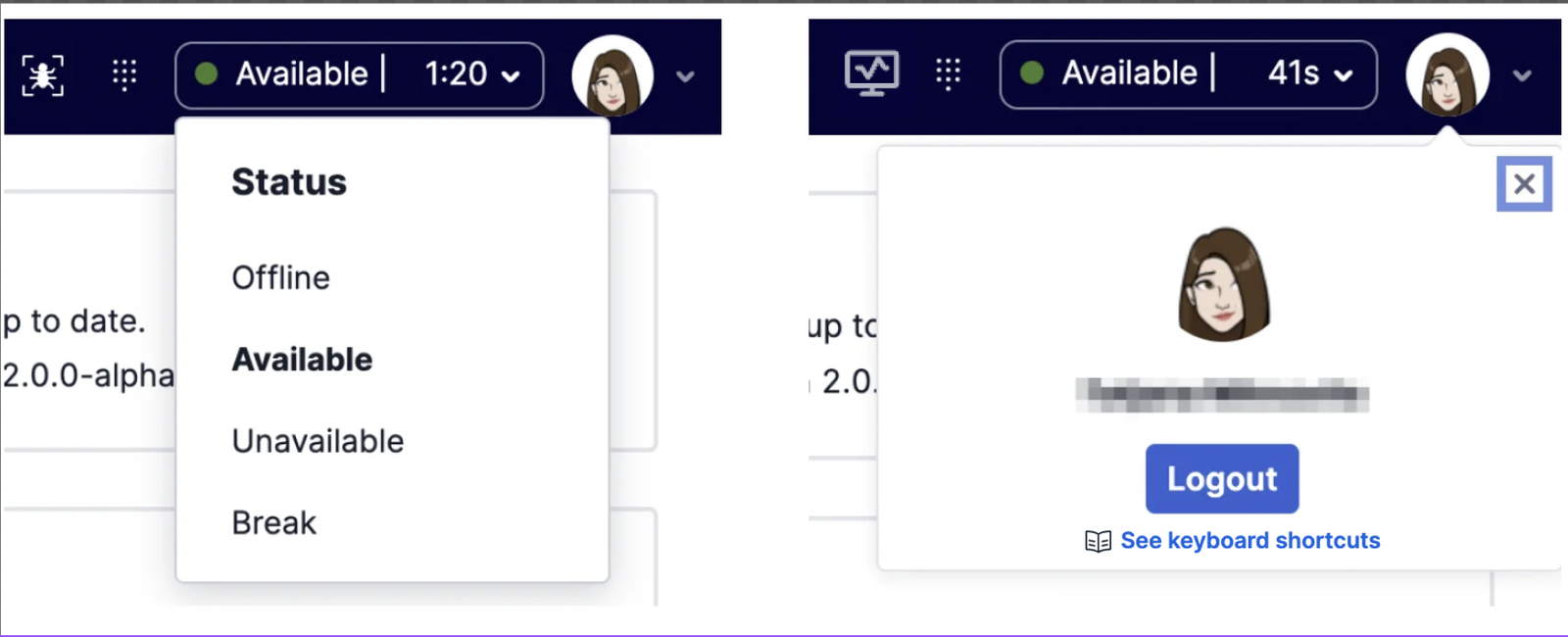
The **user-controls** child component in Flex UI 1.x.x has been split out into two new child components for the [MainHeader](https://assets.flex.twilio.com/docs/releases/flex-ui/latest/programmable-components/components/MainHeader/) in Flex UI 2.x.x:
* `activity` shows and allows the user status to be changed.
* `user-controls` shows the currently logged in user and allows the user to logout.
> \[!WARNING]
>
> This is a potential breaking change if you have customized `UserCard` and its child components using CSS.
## State Management Changes
As part of the upgrades to our core APIs, Flex UI 2.x.x includes the Redux Toolkit and some new APIs for managing your internal state. These tools provide some guardrails for your state management, helping you set up boilerplate code with better defaults.
**We recommend using single Redux store, either let Flex UI create its own store or pass a custom store using [Manager.create() API](https://assets.flex.twilio.com/docs/releases/flex-ui/latest/overview/Manager#create-config-store-promise-manager)**
### useFlexSelector
A wrapper around [Redux's `useSelector` method](https://react-redux.js.org/api/hooks#useselector). It exposes the same API but adds some Flex validations to ensure Flex's internal state is usable. This selector is specific for working with Flex state itself. Outside of accessing Flex state, we recommend using the default `useSelector`.
```javascript
const MyComponent = (props) => {
const viewState = useFlexSelector(state => state.view);
return (
{viewState.isSideNavOpen &&
My Custom Code
}
)
}
```
The selector takes the current view state for the custom component. The selector guarantees that the state being selected is safe to read and can be used in the application without side effects. This couldn't be guaranteed with `useSelector`.
### useFlexDispatch
A wrapper around [Redux's `useDispatch` method](https://react-redux.js.org/api/hooks#usedispatch). It prevents dispatches from causing side effects to Flex's state, ensuring your changes work as expected. Use this hook for interacting with Flex's state. You can use the native `useDispatch` method outside of Flex's state.
```javascript
const MyComponent = (props) => {
const viewState = useFlexSelector(state => state.view);
const dispatch = useFlexDispatch();
return (
{viewState.isSideNavOpen &&
}
)
}
```
### MessageInput.defaultProps.useSeparateInputStore
The Flex UI 2.x.x no longer uses the `MessageInput.defaultProps.useSeparateInputStore` flag and its behavior has been deprecated. All Flex UI development must now be done with a separate Store. You can remove the flag without any repercussions.
## AppConfig changes
You need to update your AppConfig structure to utilize the new config structure's names and capabilities.
| **Flex 1.x.x** | **Flex 2.x.x** | **Changes** |
| ------------------------- | ------------------------- | ------------------------------------------ |
| Notifications.**browser** | Notifications.**enabled** | renamed |
| warmTransfers | - | removed |
| colorTheme | theme | Updated ([more info](#theme-and-branding)) |
## Action changes
### Download Media Attachment changes
DownloadMedia action no longer requires "message" as a part of the payload. Instead, a new property "media" of type "Media" from @twilio/conversations is required.
### Renamed actions
These actions were renamed to follow the action naming convention:
| **Flex UI 1.0** | **Flex UI 2.x.x** |
| ---------------------------- | --------------------------- |
| `InsightsPlayer:play` | `InsightsPlayerPlay` |
| `InsightsPlayer:show` | `InsightsPlayerShow` |
| `InsightsPlayer:hide` | `InsightsPlayerHide` |
| `InsightsPlayer:initialized` | `InsightsPlayerInitialized` |
| `HistoricalReporting:view` | `HistoricalReportingView` |
## Teams View changes
### Removed
* Removed `FilterData` (shouldn't be needed) and `TeamFiltersPanelProps` (use `TeamFiltersPanelChildrenProps` instead) interfaces from `Flex.Supervisor`.
* Removed `filters` props from the Component properties for [TeamsView](https://assets.flex.twilio.com/docs/releases/flex-ui/latest/programmable-components/components/TeamsView/). Use `TeamsView.defaultProps.filters` to apply a filter.
* Removed `uniqueName` from `TaskCanvasTabsChildrenProps`.
* Removed the deprecated `WorkerProfile.defaultProps.details` prop. Use `WorkerProfile.Content` to add additional details to the worker profile panel.
* Legacy filtering in TeamsView was removed. Filters from `WorkersDataTable.defaultProps.filters` will still be added to the new filter panel, but the support for filter factories was dropped.
* `WorkersDataTable.defaultProps.initialCompareFunction` was removed. Support for sorting was added to the workers table and you can now use `sortWorkers`, `sortCalls`, and `sortTasks` on `WorkersDataTable.defaultProps` to specify the compare functions used by the workers, calls and tasks columns. For initial sorting, we've introduced a new prop, `defaultSortColumn`, to the WorkersDataTable where it would take the **key** as the value. Please refer to [WorkersDataTable of the Flex UI API Reference](https://assets.flex.twilio.com/docs/releases/flex-ui/latest/programmable-components/components/WorkersDataTable) for key details.
* `WorkersDataTable.defaultProps.tablePlaceholder` was removed. The message displayed when the table is empty can be modified with the `TeamsViewResultsSummaryNoWorkersDisplayedTitle` and `TeamsViewResultsSummaryNoWorkersDisplayed` templates.
* Cleaned up the `WorkersDataTableChildrenProps`. Only `workers`, `selectedTask`, `selectedWorker`, and `monitoredTaskSid` are now available.
* WorkersDataTable no longer forces updates every second. This could be considered breaking for customers who added columns, which contain some timers (eg. task age) and which will no longer tick every second.
## Other changes
We have also cleaned up our api and renamed or remove objects and interfaces. Most of the changes should not have any impact on plugins.
### Removed/renamed deprecated objects and interfaces
* `UserControlsImplProps` has been removed. Refer to `UserControlsChildrenProps` instead
* `call.oldHold` removed from TaskContext and `state.phone.connection.onHold` removed from state. Use `TaskHelper.isCallOnHold(task)` to get the status of the call.
* `DeprecatedLoginView` component removed
* `DeprecatedRuntimeLoginView` component removed
* `state.flex.phone.connections` property removed. Refer to `state.flex.phone.connection` instead.
* Event `selectedViewChanged` now only receives one argument (`newViewName`) and it's not triggered on view resize anymore. To listen to view resize events, please subscribe to the `viewResized` event.
* `ActionsImpl` object has been removed. Please refer to `Actions` instead.
* `registerGlobalStyles` has been removed. Please refer to `registerStyles` instead
* AudioManager's `ErrorCode` has been renamed to `AudioErrorCode`
* `Actions.emit` has been removed - use `Actions.invokeActions`instead.
* `Actions.removeAllListeners` has been removed - please use `Actions.removeListener` and provide the specific listeners you want to remove.
* Removed export of `Flex.ErrorManager`. This functionality has been replaced with `Flex.Monitor.sendDebuggerEvent`
* Removed `selectionStart`/`selectionEnd` from `MessageState`, `MessageInputArea`, `MessageInput`, `ConversationState`
* Removed show and hide methods from the `ModalPopupWithEntryControl`
* Changed `hiddenQueueFilter` to `queueFilter` which takes a predicate function. See "Add a Worker Directory Tabs Queue Filter" on [Work with Components and Props](/docs/flex/developer/ui/work-with-components-and-props) for usage details
### Removed unused objects and interfaces
* `ChatModule`
* `ChatStateCallback`
* `chatReducer`
* `registerGlobalStyles`
* `StateMachineCb`
* `StateMachine`
* `initWithStrings`
* `Version (not VERSION)`
* `Initialize (from flex-core)`
* `DeepPartial`
* `NotificationManager`
* `withDefaultPropsUpdate`
* `AggregatedDataTile`
* `ArrayInterpolation`
* `FunctionInterpolation`
* `Interpolation`
* `StyledOptions`
* `Themed`
* `CreateStyled`
* `CreateStyledOtherComponent`
* `CreateStyledStatelessComponent`
* `StyledComponent`
* `StyledComponentMethods`
* `StyledOtherComponent`
* `StyledStatelessComponent,`
* `getBackgroundWithHoverCSS`
* `ThemeSupport`
* `Utils`
* `CountryManager`
* `Animations`
* `SVGContainerProps`
* `FrameConstants`
* `StyledUl`
* `CSSProps`
### Component and config changes
* `TaskInfoPanel` inner html styles tweaked to accommodate new design
* `TaskInfoPanelContent` string inner html updated
* `TaskCanvasTabs` resets to default task when switching between tabs
* Flag `file-attachments-in-chat` is deprecated
* Customizing the [TaskListItem](https://assets.flex.twilio.com/docs/releases/flex-ui/latest/programmable-components/components/TaskListItem/) color directly is no longer possible. Please refer to `addwrapper()` in [Work with Components and Props](/docs/flex/developer/ui/work-with-components-and-props) for customizing the component