# Flex UI Components
> \[!NOTE]
>
> [Auto-Generated Documentation for the Flex UI](https://assets.flex.twilio.com/docs/releases/flex-ui/latest) is now available as a beta distribution. The auto-generated documentation is accurate and comprehensive, and so may differ from what you see in the official Flex UI documentation.
Flex UI is a library of programmable or dynamic components that expose a `Content` property and allows you to add, replace and remove any component and its children.
## Content property and add / replace / remove methods
Below you can find a list of UI components and their details, that can be overridden programmatically. This can be done by using `add`, `replace` and `remove` methods with options.
> \[!WARNING]
>
> All components must have a key declared.
### **Syntax for add/replace methods**
```javascript
Flex.Component.Content.add(, {options});
Flex.Component.Content.replace(, {options});
```
**Example**
Below is an example of adding a component called AnotherMuteButton to the MainHeader component, aligned to the end (here left) and placed as the first component in front of native components MuteButton and UserControls:
```javascript
Flex.MainHeader.Content.add(, {
sortOrder: -1,
align: "end"
});
```
### **Syntax for remove method**
Remove method allows you to remove **immediate children** of a programmable component by their key.
```javascript
Flex.Component.Content.remove(key, {options});
```
**Example**
Below is an example of removing the AnotherMuteButton component from the MainHeader component. This component is removed by the key we set above, "mute".
```javascript
Flex.MainHeader.Content.remove("mute");
```
### **Options for add/replace/remove methods**
#### if (*Expression*)
Used in both `add` and `replace` methods to add conditions on which component is added or replaced.
**Example**
```javascript
Flex.MainHeader.Content.add(, {
if : props => props.task.source.taskChannelUniqueName === "custom1"
});
```
#### sortOrder (*number*)
Used in `add` method to specify the order in which the new component is placed in relation to other children of the parent component. Native children components take priority. Sort order counter starts with 0. To always place a new component at the very start or end of the order, use large numbers like -100 or 100, depending on the direction.
**Example**
```javascript
Flex.MainHeader.Content.add(, {
sortOrder: -1
});
```
#### align ('*start*' | '*end*')
Used in the `add` method to align new components either to the top/bottom or right/left, depending on the direction of the parent component. Possible values are:
* *start* - Aligns new component on the left or top
* *end* - aligns new component on the right or bottom
**Example**
```javascript
Flex.MainHeader.Content.add(, {
align: "end"
});
```
## Programmable components
Each immediate child of a component has a key (required for the `add` and `replace` methods) and a set of properties that will be inherited by its children. To find a component's `key` or explore component props, go to [Flex UI API Reference](https://assets.flex.twilio.com/docs/releases/flex-ui/latest).
### Agents Desktop View components overview

### Teams View components overview

## RootContainer
[View Full Component Reference >](https://assets.flex.twilio.com/docs/releases/flex-ui/latest/programmable-components/components/RootContainer/)
*Direction: Horizontal*
### MainHeader
[View Full Component Reference >](https://assets.flex.twilio.com/docs/releases/flex-ui/latest/programmable-components/components/MainHeader/)
*Direction: Horizontal*

### MainContainer
[View Full Component Reference >](https://assets.flex.twilio.com/docs/releases/flex-ui/latest/programmable-components/components/MainContainer/)
*Direction: Horizontal*

### LiveCommsBar
[View Full Component Reference >](https://assets.flex.twilio.com/docs/releases/flex-ui/latest/programmable-components/components/LiveCommsBar/)
*Direction: Horizontal*

### NotificationsBar
*Direction: Horizontal*
Customizing the NotificationsBar is described in [Notifications Framework](/docs/flex/developer/ui/v1/notifications)

### SideNav
[View Full Component Reference >](https://assets.flex.twilio.com/docs/releases/flex-ui/latest/programmable-components/components/SideNav/)
*Direction: Vertical*

## Agent Desktop View Components
### AgentDesktopView
[View Full Component Reference >](https://assets.flex.twilio.com/docs/releases/flex-ui/latest/programmable-components/components/AgentDesktopView/)
*Direction: Horizontal*

### AgentDesktopView.Panel1
[View Full Component Reference >](https://assets.flex.twilio.com/docs/releases/flex-ui/latest/programmable-components/components/Panel1/)
*Direction: Vertical*

### AgentDesktopView.Panel2
[View Full Component Reference >](https://assets.flex.twilio.com/docs/releases/flex-ui/latest/programmable-components/components/Panel2/)
*Direction: Vertical*

### CRMContainer
[View Full Component Reference >](https://assets.flex.twilio.com/docs/releases/flex-ui/latest/programmable-components/components/CRMContainer/)
*Direction: Vertical*

### NoTasksCanvas
[View Full Component Reference >](https://assets.flex.twilio.com/docs/releases/flex-ui/latest/programmable-components/components/NoTasksCanvas/)
*Direction: Vertical*

### TaskListContainer
[View Full Component Reference >](https://assets.flex.twilio.com/docs/releases/flex-ui/latest/programmable-components/components/TaskListContainer/)
*Direction: Vertical*

### TaskList
[View Full Component Reference >](https://assets.flex.twilio.com/docs/releases/flex-ui/latest/programmable-components/components/TaskList/)
*Direction: Vertical*
For details on how to configure filters for the task list, see the UI configuration page.

### TaskListItem
[View Full Component Reference >](https://assets.flex.twilio.com/docs/releases/flex-ui/latest/programmable-components/components/TaskListItem/)
*Direction: Vertical*
*Add / Replace / Remove and properties of the TaskListItem are described in the Task Channel Definition API.*

### TaskListItemButtons
*Direction: Horizontal*
Add / Replace / Remove and properties of the TaskListItem are described in the Task Channel Definition API.

**Examples**
*Adding a button to Chat type task*
```javascript
Flex.DefaultTaskChannels.Chat.addedComponents = [{
target: "TaskListButtons",
component:
}];
```
*Adding a button to Chat type task when it is in* `accepted` *state*
```javascript
Flex.DefaultTaskChannels.Chat.addedComponents = [{
target: "TaskListButtons",
component: ,
options: { if: props.task.status === "accepted" }
}];
```
*Removing a* `reject` *button from Chat type task*
```javascript
Flex.DefaultTaskChannels.Chat.removedComponents = [{
target: "TaskListButtons",
key: "reject"
}];
```
### TaskCanvas
[View Full Component Reference >](https://assets.flex.twilio.com/docs/releases/flex-ui/latest/programmable-components/components/Supervisor․TaskInfoPanel/)
*Direction: Vertical*

### TaskCanvasHeader
[View Full Component Reference >](https://assets.flex.twilio.com/docs/releases/flex-ui/latest/programmable-components/components/TaskCanvasHeader/)
*Direction: Horizontal*

### TaskCanvasTabs
[View Full Component Reference >](https://assets.flex.twilio.com/docs/releases/flex-ui/latest/programmable-components/components/TaskCanvasTabs/)
*Direction: Horizontal*

**Example**
*Add tabs and content*
```xml
import { Tab } from "@twilio/flex-ui"
init(flex, manager) {
const Img =  ;
flex.TaskCanvasTabs.Content.add(
);
}
```
### TaskInfoPanel
[View Full Component Reference >](https://assets.flex.twilio.com/docs/releases/flex-ui/latest/programmable-components/components/TaskInfoPanel/)
*Direction: Vertical*

### IncomingTaskCanvas
[View Full Component Reference >](https://assets.flex.twilio.com/docs/releases/flex-ui/latest/programmable-components/components/IncomingTaskCanvas/)
*Direction: Vertical*

### IncomingTaskCanvasActions
[View Full Component Reference >](https://assets.flex.twilio.com/docs/releases/flex-ui/latest/programmable-components/components/IncomingTaskCanvasActions/)
*Direction: Horizontal*

### CallCanvas
[View Full Component Reference >](https://assets.flex.twilio.com/docs/releases/flex-ui/latest/programmable-components/components/CallCanvas/)
*Direction: Vertical*

### CallCanvasActions
[View Full Component Reference >](https://assets.flex.twilio.com/docs/releases/flex-ui/latest/programmable-components/components/CallCanvasActions/)
*Direction: Horizontal*

### MessagingCanvas
[View Full Component Reference >](https://assets.flex.twilio.com/docs/releases/flex-ui/latest/programmable-components/components/MessagingCanvas/)
*Direction: Vertical*

### MessageList
[View Full Component Reference >](https://assets.flex.twilio.com/docs/releases/flex-ui/latest/programmable-components/components/MessageList/)
*Direction: Horizontal*

### MessageList.WelcomeMessage
[View Full Component Reference >](https://assets.flex.twilio.com/docs/releases/flex-ui/latest/programmable-components/components/WelcomeMessage/)
*Direction: Vertical*

### MessageListItem
[View Full Component Reference >](https://assets.flex.twilio.com/docs/releases/flex-ui/latest/programmable-components/components/MessageListItem/)
*Direction: Vertical*

### MessageBubble
[View Full Component Reference >](https://assets.flex.twilio.com/docs/releases/flex-ui/latest/programmable-components/components/MessageBubble/)
*Direction: Vertical*

### MessageInput
[View Full Component Reference >](https://assets.flex.twilio.com/docs/releases/flex-ui/latest/programmable-components/components/MessageInput/)
*Direction: Vertical*

### WorkerDirectory
[View Full Component Reference >](https://assets.flex.twilio.com/docs/releases/flex-ui/latest/programmable-components/components/WorkerDirectory/)
*Direction: Horizontal*

### WorkerDirectoryTabs
[View Full Component Reference >](https://assets.flex.twilio.com/docs/releases/flex-ui/latest/programmable-components/components/WorkerDirectoryTabs/)
*Direction: Vertical*
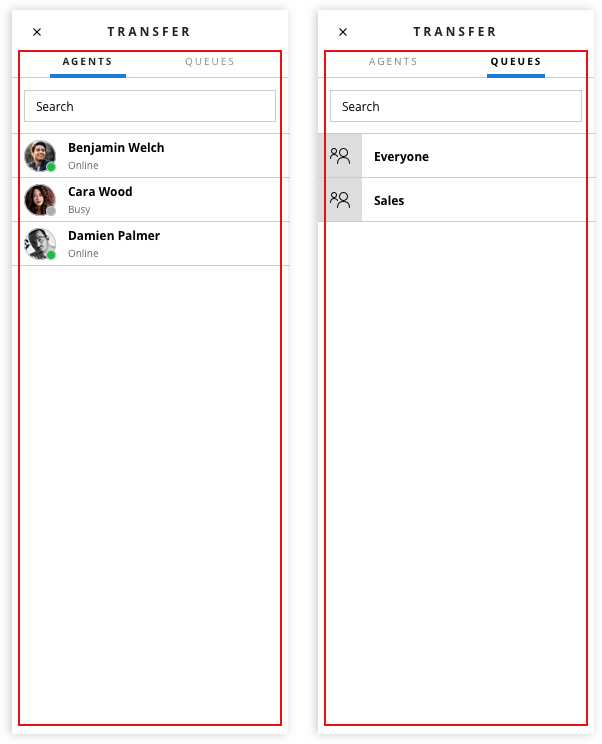
The Worker directory contains 2 tabs by default:
* **Agents** - key `workers`
* **Queues**- key `queues`
*Example: Add new custom tab*
```javascript
Flex.WorkerDirectory.Tabs.Content.add(
;
flex.TaskCanvasTabs.Content.add(
);
}
```
### TaskInfoPanel
[View Full Component Reference >](https://assets.flex.twilio.com/docs/releases/flex-ui/latest/programmable-components/components/TaskInfoPanel/)
*Direction: Vertical*

### IncomingTaskCanvas
[View Full Component Reference >](https://assets.flex.twilio.com/docs/releases/flex-ui/latest/programmable-components/components/IncomingTaskCanvas/)
*Direction: Vertical*

### IncomingTaskCanvasActions
[View Full Component Reference >](https://assets.flex.twilio.com/docs/releases/flex-ui/latest/programmable-components/components/IncomingTaskCanvasActions/)
*Direction: Horizontal*

### CallCanvas
[View Full Component Reference >](https://assets.flex.twilio.com/docs/releases/flex-ui/latest/programmable-components/components/CallCanvas/)
*Direction: Vertical*

### CallCanvasActions
[View Full Component Reference >](https://assets.flex.twilio.com/docs/releases/flex-ui/latest/programmable-components/components/CallCanvasActions/)
*Direction: Horizontal*

### MessagingCanvas
[View Full Component Reference >](https://assets.flex.twilio.com/docs/releases/flex-ui/latest/programmable-components/components/MessagingCanvas/)
*Direction: Vertical*

### MessageList
[View Full Component Reference >](https://assets.flex.twilio.com/docs/releases/flex-ui/latest/programmable-components/components/MessageList/)
*Direction: Horizontal*

### MessageList.WelcomeMessage
[View Full Component Reference >](https://assets.flex.twilio.com/docs/releases/flex-ui/latest/programmable-components/components/WelcomeMessage/)
*Direction: Vertical*

### MessageListItem
[View Full Component Reference >](https://assets.flex.twilio.com/docs/releases/flex-ui/latest/programmable-components/components/MessageListItem/)
*Direction: Vertical*

### MessageBubble
[View Full Component Reference >](https://assets.flex.twilio.com/docs/releases/flex-ui/latest/programmable-components/components/MessageBubble/)
*Direction: Vertical*

### MessageInput
[View Full Component Reference >](https://assets.flex.twilio.com/docs/releases/flex-ui/latest/programmable-components/components/MessageInput/)
*Direction: Vertical*

### WorkerDirectory
[View Full Component Reference >](https://assets.flex.twilio.com/docs/releases/flex-ui/latest/programmable-components/components/WorkerDirectory/)
*Direction: Horizontal*

### WorkerDirectoryTabs
[View Full Component Reference >](https://assets.flex.twilio.com/docs/releases/flex-ui/latest/programmable-components/components/WorkerDirectoryTabs/)
*Direction: Vertical*

The Worker directory contains 2 tabs by default:
* **Agents** - key `workers`
* **Queues**- key `queues`
*Example: Add new custom tab*
```javascript
Flex.WorkerDirectory.Tabs.Content.add(
"Hello World"
);
```
**Worker Directory Tabs Hidden Filters**
`WorkerDirectoryTabs` accepts 2 default props:
* `hiddenWorkerFilter`
* `hiddenQueueFilter`
These filters are applied to the list in combination with the filter applied by the user typing in the search string. You can programmatically apply a filter that is hidden from the user, i.e. the user cannot disable it. You could use this feature to pre-filter the list of available transferees an agent can search and choose from, to their team members or available agents only. In the following example, we use [live query](/docs/sync/live-query) to:
* filter the agents list to only show agents with a specific `team_name` attribute ([you can set user attributes via your SSO provider](/docs/flex/admin-guide/setup/sso-configuration))
* filter the agents list to only show agents that are in the `Available` activity
* filter the queues list to only show queues with a specific `queue_name` attribute
```javascript
// Filter Agents by Worker Attributes or activity_name
Flex.WorkerDirectoryTabs.defaultProps.hiddenWorkerFilter = 'data.attributes.team_name CONTAINS "sales"'
Flex.WorkerDirectoryTabs.defaultProps.hiddenWorkerFilter = 'data.activity_name CONTAINS "Available"'
// Filter Queues by queue_name or queue_sid
Flex.WorkerDirectoryTabs.defaultProps.hiddenQueueFilter = 'data.queue_name CONTAINS "sales"'
```
The hidden filter feature is only available in [@twilio/flex-ui@1.26.0](/docs/flex/release-notes/ui-release-notes) and later.
### ParticipantsCanvas
[View Full Component Reference >](https://assets.flex.twilio.com/docs/releases/flex-ui/latest/programmable-components/components/ParticipantsCanvas/)
*Direction: Horizontal*
ParticipantsCanvas is a responsive component and will switch between regular mode and list mode depending on the size of the container its placed in. Regular mode and list mode contain different children - ParticipantCanvas and ParticipantCanvasListItem respectively. When customizing ParticipantsCanvas children, like adding an additional button, remember to do customization to both children components
**Regular mode**

**List mode**

### ParticipantCanvas
[View Full Component Reference >](https://assets.flex.twilio.com/docs/releases/flex-ui/latest/programmable-components/components/ParticipantCanvas/)
*Direction: Horizontal*

### ParticipantCanvasListItem
*Direction: Vertical*

## Teams View Components
### WorkersDataTable
`WorkersDataTable` is a programmable component. It is a Material UI table styled to the Flex theme with data from the Insights SDK.
[View Full Component Reference >](https://assets.flex.twilio.com/docs/releases/flex-ui/latest/WorkersDataTable.html)
> \[!WARNING]
>
> As of flex-ui **v1.12.0** new exports were added to refer to workers instead of agents:
>
> * WorkersDataTable
> * WorkerListFilterSelect
> * WorkersDataTable
> * WorkersDataTableProps
> * WorkerListFilter
>
> For example, `AgentsDataTable` is now referred to as `WorkersDataTable`. However, previous exports (like `AgentsDataTable`) are kept for backwards compatibility
By default, WorkersDataTable contains the following rows:
* *Agent* - [UserCard component](https://assets.flex.twilio.com/docs/releases/flex-ui/latest/programmable-components/components/Supervisor%E2%80%A4TaskCard/)
* `SupervisorUserCardFirstLine` - default value retrieves the full name of the worker if it exists, and the identity if not. Variables provided to the template: worker
* `SupervisorUserCardSecondLine` - default value shows the availability of the worker. Variables provided to the template: worker
* The first and second row are template strings with names.
* *Calls* -[TaskCardList component](https://assets.flex.twilio.com/docs/releases/flex-ui/latest/programmable-components/components/Supervisor%E2%80%A4TaskCardList/), showing tasks of the voice channel in assigned and wrapping state
* *Other tasks* - [TaskCardList component](https://assets.flex.twilio.com/docs/releases/flex-ui/latest/programmable-components/components/Supervisor%E2%80%A4TaskCardList/), showing tasks of all channels (apart from voice) in assigned and wrapping state
#### Add columns to WorkersDataTable
Columns can be added to the table programmatically. Columns cannot be removed yet (the ability to do that is coming soon). You can add columns with different types of content:
* `TaskCardList` component
* Any custom component
* String
*TaskCardList*
```javascript
import { TaskCardList, ColumnDefinition } from "@twilio/flex-ui";
Flex.WorkersDataTable.Content.add(
} />);
```
`TaskCardList` also has a filter prop which can be used here, and which is optional. If the filter prop is not set, all tasks in the list will be rendered:
```javascript
export interface TaskCardListProps {
compareFunction?: (a: TaskData, b: TaskData) => number;
filter?: (task: TaskData) => boolean;
tasks: TaskData[];
}
```
*Any custom component*
```javascript
import { ColumnDefinition } from "@twilio/flex-ui";
Flex.WorkersDataTable.Content.add(hello}/>);
```
*String*
You can use Worker attributes as follows:
```javascript
import { ColumnDefinition } from "@twilio/flex-ui";
Flex.WorkersDataTable.Content.add( item.worker.attributes.team_name}/>);
```
#### Customizing filters
By default, WorkersDataTable has 2 filters:
* **All agents**
* **Active agents** - worker with current activity state set of type `available`
Filters for the Workers Table can be programmatically changed, by defining `filters` property of `WorkersDataTable` component
**Example of creating a filter to show workers with activity "Break"**
*With configuration object*
```javascript
componentProps: {
WorkersDataTable: {
filters: [
{
query: 'data.activity_name == "Break"',
text: "Workers on break"
}
]
}
},...
```
*With defaultProps API*
```javascript
Flex.WorkersDataTable.defaultProps.filters = [
{
query: 'data.activity_name == "Break"',
text: "Workers on break"
},...
]
```
#### Query syntax
**Query data schema**
`data` object in the query refers to TaskRouter `worker` resource. The following attributes on a worker can be used for filters query:
| **object name** | **description** | **format** |
| ---------------------------- | ------------------------------------------------------ | ---------------- |
| data.activity\_name | worker's current activity friendly name | String |
| data.attributes | worker's attributes | Key value pair |
| data.date\_activity\_changed | date of the last activity change of the current worker | Datetime ISO8601 |
| data.friendly\_name | worker's friendly name | String |
| data.worker\_activity\_sid | worker's current activity sid | String |
| data.worker\_sid | worker's sid | String |
| data.workspace\_sid | worker's workspace sid | String |
**Query operators**
`WorkersDataTable` is powered by [Twilio Sync](/docs/sync) and we use Twilio Sync Live Query for filtering of the workers. See [Live Query docs](/docs/sync/live-query) for supported query operators.
### TaskCardList
[View Full Component Reference >](https://assets.flex.twilio.com/docs/releases/flex-ui/latest/programmable-components/components/Supervisor.TaskCardList/)
*Direction: Vertical*

### TaskCard
[View Full Component Reference >](https://assets.flex.twilio.com/docs/releases/flex-ui/latest/programmable-components/components/Supervisor․TaskCard/)
*Direction: Horizontal*

### UserCard
*Direction: Horizontal*

### Supervisor.TaskCanvas
[View Full Component Reference >](https://assets.flex.twilio.com/docs/releases/flex-ui/latest/programmable-components/components/SupervisorTaskCanvas/)
*Direction: Vertical*

### Supervisor.TaskCanvasHeader
[View Full Component Reference >](https://assets.flex.twilio.com/docs/releases/flex-ui/latest/programmable-components/components/Supervisor․TaskCanvasHeader/)
*Direction: Vertical*

### Supervisor.TaskCanvasTabs
[View Full Component Reference >](https://assets.flex.twilio.com/docs/releases/flex-ui/latest/programmable-components/components/Supervisor․TaskCanvasTabs/)
*Direction: Horizontal*

Worker directory contains 2 tabs by default:
* **Overview** - key `overview`. Overview Tab has dynamic content based on the type of task
* For standard conference based voice tasks - [ParticipantsCanvas](https://assets.flex.twilio.com/docs/releases/flex-ui/latest/programmable-components/components/ParticipantsCanvas/)
* For messaging tasks - [MessagingCanvas](https://assets.flex.twilio.com/docs/releases/flex-ui/latest/programmable-components/components/MessagingCanvas/)
* **Info** - key `info`. Info tab Contains [SupervisorTaskInfoPanel](https://assets.flex.twilio.com/docs/releases/flex-ui/latest/programmable-components/components/Supervisor%E2%80%A4TaskInfoPanel/)
**Examples**
*Adding tabs and content*
```javascript
Flex.Supervisor.TaskCanvasTabs.Content.add(
"Hello World"
);
```
### SupervisorTaskInfoPanel
[View Full Component Reference >](https://assets.flex.twilio.com/docs/releases/flex-ui/latest/programmable-components/components/Supervisor․TaskInfoPanel/)
*Direction: Horizontal*

### WorkerCanvas
[View Full Component Reference >](https://assets.flex.twilio.com/docs/releases/flex-ui/latest/programmable-components/components/WorkerCanvas/)
*Direction: Vertical*

### WorkerCanvasHeader
[View Full Component Reference >](https://assets.flex.twilio.com/docs/releases/flex-ui/latest/programmable-components/components/WorkerCanvas/#component-children)
*Direction: Vertical*

### WorkerProfile
[View Full Component Reference >](https://assets.flex.twilio.com/docs/releases/flex-ui/latest/programmable-components/components/WorkerProfile/)
*Direction: Vertical*

### WorkerSkills
[View Full Component Reference >](https://assets.flex.twilio.com/docs/releases/flex-ui/latest/programmable-components/components/WorkerSkills/)
*Direction: Vertical*
