# Conversational Intelligence onboarding guide
> \[!NOTE]
>
> Voice Intelligence is now Conversational Intelligence, which reflects our expansion into analyzing conversations across all customer touchpoints. For more information, see the [announcement](https://www.twilio.com/en-us/blog/introducing-conversational-intelligence).
> \[!WARNING]
>
> Conversational Intelligence uses artificial intelligence and machine learning technologies. By enabling or using any of the features or functionalities within Programmable Voice that are identified as using artificial intelligence or machine learning technology, you acknowledge and agree that your use of these features or functionalities is subject to the terms of the [Predictive and Generative AI/ML Features Addendum](https://www.twilio.com/en-us/legal/ai-terms/predictive-generative-ai-features).
>
> Conversational Intelligence isn't PCI compliant and shouldn't be used in workflows that are subject to PCI. Conversational Intelligence for Messaging (Private Beta) isn't a HIPAA Eligible Service and shouldn't be used in workflows that are subject to HIPAA.
Conversational Intelligence helps you analyze and collect useful data insights from customer conversations through artificial intelligence (AI) technologies.
In this guide, you'll learn the key concepts of Conversational Intelligence, including:
* What types of conversations are supported
* An introduction to transcription, both real-time and post-interaction
* An explanation of Language Operators
* The definition and settings of an Intelligence Service
Then, you'll be guided through the steps required to set up and use Conversational Intelligence. For each step, instructions are provided for using both the Twilio Console and the Conversational Intelligence API.
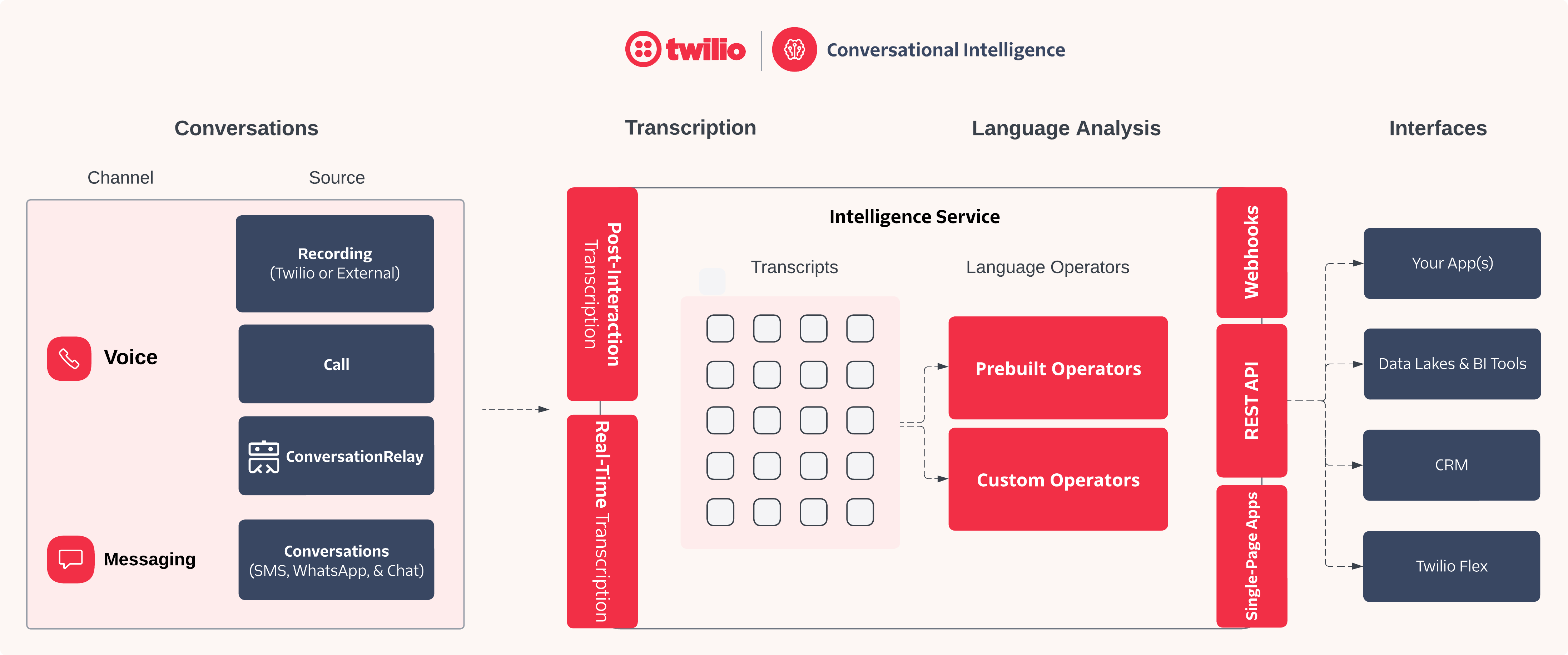
## System architecture diagram
## Key concepts
To help explain the components of the diagram above, this section outlines the key concepts of Conversational Intelligence.
### Conversations
Conversations are interactions between two or more parties. With Conversational Intelligence, conversations can be transcribed, analyzed with Language Operators, or both.
Conversational Intelligence supports a variety of different conversation types, defined by their **channel** and **source** as illustrated in the table below:
| **Channel** | **Source** | **Status** | **Transcription** | **Language Operators** |
| ------------- | --------------------------------------------------- | -------------------------------------------------------------------------------------------------------------------------------- | ----------------- | ---------------------- |
| **Voice** | Twilio Recordings | ✅ Available | Post-interaction | Post-interaction |
| | External Recordings | ✅ Available | Post-interaction | Post-interaction |
| | Calls | ✅ Available | Real-time | Post-interaction |
| | ConversationRelay **NEW** | ✅ Available | Imported | Post-interaction |
| **Messaging** | Conversations **NEW** | 🔒 Private beta
[Request access](https://www.twilio.com/en-us/lp/conversational-intelligence-messaging-beta) | Imported | Post-interaction |
To get started with Conversational Intelligence, you will first need to identify which conversation type(s) you would like to transcribe and analyze. Depending on the conversation channel and source, you will need to take different actions to configure Conversational Intelligence successfully.
### Transcripts
A Conversational Intelligence [Transcript resource](/docs/conversational-intelligence/api/transcript-resource) represents a transcribed conversation that is stored in the Conversational Intelligence historical log. Conversational Intelligence can perform the transcription itself – as in the case for Recordings and Calls – and it can also import previously generated transcripts from other sources, such as ConversationRelay. Regardless of the source, all transcripts can be analyzed with Language Operators.
There are two transcription types:
* **Post-interaction transcription** \[Recordings]: Transforms a voice recording into text after the conversation has ended. You can transcribe both Twilio and externally hosted recordings.
* **Real-time transcription** \[Calls]: Transform live audio utterances from a Twilio call into text during the conversation.
### Language Operators
Language Operators are AI-powered natural language understanding tasks. Language Operators are the core of Conversational Intelligence, allowing you to extract insights from your conversations tailored to your business' unique needs. They can be used to analyze transcripts and provide valuable information about the conversation, such as sentiment analysis, call scoring, topic detection, and more. Currently, all Language Operators are executed post-interaction (after the call, virtual agent session, etc.).
> \[!IMPORTANT]
>
> Use LLM-powered Language Operators for sophisticated and flexible natural language understanding tasks. For more information, see the [Generative Custom Operators docs](/docs/conversational-intelligence/generative-custom-operators).
Conversational Intelligence supports two types of Language Operators:
* [Pre-built Language Operators](#add-a-pre-built-language-operator): Operators created by Twilio or trained using third-party AI models.
* [Custom Operators](#create-and-add-a-custom-operator): Operators you create on your account.
You can add and configure Language Operators to a Service using the Twilio Console or the Conversational Intelligence API. For more detailed information, see [Language Operators](/docs/conversational-intelligence/language-operators).
### Intelligence Services
An Intelligence Service represents an individual configuration for Transcripts and Language Operators. Intelligence Services help you organize and centralize the settings needed to efficiently manage transcription (if applicable) and analysis tasks.
Twilio's Intelligence Service allows you to:
* Add one or more Language Operators to run against stored Transcripts to gain insights.
* Control and configure the processing of recordings into Transcripts.
* Elect whether you will redact PII from conversational data.
You can create multiple Services within a single Account to suit your needs. To learn more about the different configuration options for an Intelligence Service, see [Creating an Intelligence Service](#create-an-intelligence-service).
You must create at least one Service before you can transcribe a recording or add Language Operators to your Transcripts. For Real-Time Transcription, ConversationRelay, and Messaging Conversations, an Intelligence Service is a prerequisite to storing transcripts and running Language Operators.
Now that you've learned the key concepts of Conversational Intelligence, let's start setting it up for your Twilio account.
## Create an Intelligence Service
Regardless of which conversation type you choose, you will need to create an Intelligence Service. This Service will be used to configure the Language Operator and transcription (if applicable) settings for your conversations.
> \[!NOTE]
>
> The Intelligence Service **exposes configurable transcription settings** that determine how post-interaction transcription is performed for Recordings (Twilio & External). Please see the section on [post-interaction transcription](#recordings-post-interaction) for more details on how to set these options.
The easiest way to create an Intelligence Service is through the Twilio Console:
1. [Log in](https://www.twilio.com/login) to the Twilio Console.
2. Navigate to [Conversational Intelligence > Services](https://console.twilio.com/us1/develop/conversational-intelligence/services).
3. Click **Create new Service**. A pop-up window will appear asking you to:
* Provide a **Unique Name** for your Service, such as *CustomerSupportTranscription*.
* Add a **Friendly Name**, a brief description of your Service.
* Select the transcription **language code** that best fits your needs. [more info](#supported-languages)
* Accept the **Predictive and Generative AI/ML Features Addendum**.
* (Optional) Select one or more of the following options:
* **PII redaction**: Redacts Personally Identifiable Information from your data. [more info](#redacting-pii)
* **Auto Transcribe**: Automatically transcribes the recorded voice data. [more info](#transcription-methods)
* **Enable data use** (optional): Allows the usage of captured data. [more info](#data-use-option)
4. Click **Create** to complete the setup. Your new Service is ready for use.
For most customers, using the Twilio Console is recommended for creating and managing your Intelligence Service. If preferred, you may also use the [API for creating a Service](/docs/conversational-intelligence/api/service-resource#create-a-service).
### Redacting PII
PII redaction removes personally identifiable information from text transcriptions or media recordings to help protect sensitive data. Conversational Intelligence allows you to redact PII from your conversations. PII redaction utilizes artificial intelligence and machine learning technologies.
You can redact the following fields by enabling this feature:
* Address
* CVV
* City
* Country
* CreditCard
* CreditCardExpiration
* DOB
* Date
* Email
* Name
* PhoneNumber
* SSN
* ZipCode
Note that at this time, all of these PII fields will be redacted if PII redaction is enabled on an Intelligence Service.
Other important notes:
* PII redaction from transcript text is available for all supported Transcription languages.
* PII redaction from media recordings (removing the PII utterances in the audio itself) is available only in `en-US`.
> \[!WARNING]
>
> If you change the PII redaction or auto-transcribe setting on an existing Intelligence Service, it may take up to 10 minutes to take effect.
### Data use option
Optionally, you can consent to allow Twilio and its affiliates to use the data or other information disclosed or provided to Twilio through your use of Twilio Conversational Intelligence to develop and improve Twilio's products and services, including Twilio's artificial intelligence or machine learning technology, subject to the terms of the [Twilio Conversational Intelligence: Data Use Addendum](https://www.twilio.com/en-us/legal/ai-terms/voice-intelligence-data-use)
## Transcribing with Intelligence
Conversational Intelligence provides transcription-as-a-service for the voice channel, converting raw voice call audio into text. This is a prerequisite to insight extraction via [Language Operators](#language-operators). There are two types of transcription offered through Conversational Intelligence:
* **Post-interaction transcription** \[Recordings]: Transforms a voice recording into text after the conversation has ended. You can transcribe both Twilio and externally hosted recordings.
* **Real-time transcription** \[Calls]: Transform live audio utterances from a Twilio call into text during the conversation.
As mentioned above, Conversational Intelligence can perform the transcription itself – as in the case for Recordings and Calls – and it can also import previously generated transcripts from other sources, such as ConversationRelay. This is summarized in the table below:
| **Channel** | **Source** | **Transcript Generated by Conversational Intelligence?** | **Conversational Intelligence Transcript Method** |
| ------------- | ------------------- | ------------------------------------------------------------------------------------- | ------------------------------------------------- |
| **Voice** | Twilio Recordings | ✅ Yes | Post-interaction |
| | External Recordings | ✅ Yes | Post-interaction |
| | Call | ✅ Yes | Real-Time |
| | ConversationRelay | ❌ No – generated via [ConversationRelay](/docs/voice/twiml/connect/conversationrelay) | Imported |
| **Messaging** | Conversations | ❌ No – already in text format | Imported |
### Recordings (Post-interaction)
Conversational Intelligence supports post-interaction transcription of voice call recordings. This includes both Twilio Recordings and External Recordings.
> \[!WARNING]
>
> Conversational Intelligence can't transcribe encrypted recordings or recordings of [PCI](/docs/voice/tutorials/how-to-capture-payment-during-a-voice-call-generic-pay-connector#1-enable-pci-mode)-compliant accounts.
#### Supported languages
The following table lists the current language support for Conversational Intelligence Post-interaction transcription. Each Intelligence Service will be tagged with one language code it will use for post-interaction transcription. For Operator language support, see the [Multilanguage support section](/docs/conversational-intelligence/language-operators#multilanguage-support) of the Language Operators page.
| Supported language | Language code |
| ------------------------ | ------------- |
| Danish - Denmark | `da-DK` |
| Dutch - Netherlands | `nl-NL` |
| English - Australia | `en-AU` |
| English - United Kingdom | `en-GB` |
| English - United States | `en-US` |
| French - France | `fr-FR` |
| German - Germany | `de-DE` |
| Italian - Italy | `it-IT` |
| Norwegian - Norway | `no-NO` |
| Polish - Poland | `pl-PL` |
| Portuguese - Brazil | `pt-BR` |
| Portuguese - Portugal | `pt-PT` |
| Spanish - Mexico | `es-MX` |
| Spanish - Spain | `es-ES` |
| Spanish - United States | `es-US` |
| Swedish - Sweden | `sv-SE` |
The `LanguageCode` set during Intelligence Service creation determines the post-interaction transcription language for all voice call recordings processed by that Service. The default is `en-US` if no `LanguageCode` is set.
> \[!NOTE]
>
> A Service supports only one `LanguageCode`, which can't be updated once set. To transcribe voice call recordings in multiple languages, create a separate Service for each language.
#### Transcription methods
You can choose between two methods for handling transcriptions:
* **Auto Transcribe**: Configure your Intelligence Service to automatically transcribe all new Voice call recordings. While this option offers convenience by processing recordings automatically, it doesn't provide fine-grained control over transcript attributes. *Only available for Twilio Recordings.*
* **Create Transcripts via API**: Use the [Transcript REST API](/docs/conversational-intelligence/api/transcript-resource#create-a-new-transcript) to trigger transcription for specific recordings. This method allows for more detailed configuration of transcript attributes by referencing the Twilio Recording SID.
Whether you enabled *Auto Transcribe* on your Intelligence Service or not will determine what actions you need to take to trigger these recordings to be sent to Conversational Intelligence.
#### Auto Transcribe
Enabling automatic transcription lets you transcribe Voice call recordings without needing to call the [Create Transcript Resource endpoint](/docs/conversational-intelligence/api/transcript-resource). Enable `auto_transcribe` through the [Service Resource](/docs/conversational-intelligence/api/service-resource) or via the Console by navigating to [Conversational Intelligence > Services](https://console.twilio.com/us1/develop/conversational-intelligence/services) > **Settings**. You can enable this option at any time during and after the initial Service creation.
If you enabled Auto Transcribe on your Intelligence Service, all new Twilio Recordings will be automatically sent to Conversational Intelligence for transcription. You don't need to take any further action.
While the `auto_transcribe` feature provides simplicity and convenience by automatically sharing recordings with Conversational Intelligence, it doesn't offer fine-grained control for setting transcript attributes—such as participant settings and media information—that may be useful when viewing transcript and Language Operator results. For complete transcript attribute control, we recommend creating transcripts using the [Create Transcription API Endpoint](/docs/conversational-intelligence/api/transcript-resource#create-a-new-transcript).
> \[!WARNING]
>
> Enabling `auto_transcribe` in more than one Service results in multiple transcriptions and charges.
The `auto_transcribe` property doesn't function as expected under these conditions:
* If the Account is PCI-compliant.
* If the recordings are encrypted with a client key.
* If the recordings use external storage.
Conversational Intelligence supports transcribing [Twilio Recordings](/docs/voice/api/recording). Twilio Recordings can be transcribed with Conversational Intelligence either through Auto Transcribe or via the Transcripts API.
#### Using the Transcripts API
Using the Transcripts API supports more fine-grained control of setting transcript metadata when compared to auto transcribe, including [setting participant information](/docs/conversational-intelligence/api/transcript-resource#specify-participant-information) and channel information.
See specific API doc examples for:
* [Transcribe a Twilio Recording](/docs/conversational-intelligence/api/transcript-resource#transcribe-a-twilio-recording)
* [Transcribe an External Recording](/docs/conversational-intelligence/api/transcript-resource#transcribe-an-external-recording)
If you did not enable Auto Transcribe, you **must** call the Create Transcript API endpoint to generate a transcript from a recording in Conversational Intelligence. Please see the [API docs](/docs/conversational-intelligence/api/transcript-resource#transcribe-a-twilio-recording) for more details on how to use the Transcripts API to upload a Twilio Recording.
#### Uploading External Recordings
Conversational Intelligence supports third-party media recordings. Please see the [API docs](/docs/conversational-intelligence/api/transcript-resource#transcribe-an-external-recording) for more details on how to use the Transcripts API to upload an External Recording.
> \[!NOTE]
>
> Uploading External Recordings to Conversational Intelligence can **only** be done through the Transcripts API. Auto Transcribe is not supported for External Recordings.
#### Use dual-channel recordings
Conversational Intelligence automatically transcribes and analyzes dual-channel media files of
voice recordings when available. For a [dual-channel recording](https://www.twilio.com/blog/announcing-dual-channel-call-recordings-by-default), Twilio stores the audio from the
recording on two different tracks in the same media file.
Using dual-channel recordings with Conversational Intelligence provides the following benefits:
* Higher accuracy when generating data insights from your conversations.
* Added ability to map and override participants with additional metadata. This metadata is useful for search and business reporting.
##### Dual-channel recordings for two-party Twilio Voice recordings
Twilio two-party Voice call recordings are dual-channel by default.
For two-party calls, one channel contains the audio from one call leg, and the other channel contains
the audio from the other call leg.
By default, Voice Intelligence treats channel 1 of a dual-channel recording as the "agent" audio and channel 2 as the "customer" audio. If this doesn't match your application's implementation of recordings, you can do one of the following:
* Update your application's logic so that the "agent" is always on the first channel. For two-party calls, the first channel is the first call leg.
* If your application logic has all of your "agents" on channel 2 and all of your "customers" on channel 1, contact Twilio Support to invert the agent/customer Conversational Intelligence labeling at the account level. This affects all recordings within that account.
* If the first two options aren't possible with your application,[specify participant information](/docs/conversational-intelligence/api/transcript-resource#specifying-participant-information) in the request to create a [transcript](/docs/conversational-intelligence/api/transcript-resource).
##### Dual-channel recordings for Twilio Voice conference recordings
For conference recordings, you can [turn on dual-channel conference recordings on the Voice Settings page in the Twilio Console](https://www.twilio.com/en-us/changelog/dual-channel-voice-conference-recordings).
For conference recordings, the audio from the first participant that joined the conference is on one
channel, and the rest of the audio from the conference is mixed together on the second
channel.
By default, Voice Intelligence treats channel 1 of a dual-channel recording as the "agent" audio and channel 2 as the "customer" audio. If this doesn't match your application's implementation of recordings, you can do one of the following:
* Update your application's logic so that the "agent" is always on the first channel. For conferences, the first channel is the first participant that joined the recorded conference.
* If your application logic has all of your "agents" on channel 2 and all of your "customers" on channel 1, contact Twilio Support to invert the agent/customer Conversational Intelligence labeling at the account level. This affects all recordings within that account.
* If the first two options aren't possible with your application,[specify participant information](/docs/conversational-intelligence/api/transcript-resource#specifying-participant-information) in the request to create a [transcript](/docs/conversational-intelligence/api/transcript-resource).
##### Dual-channel recordings for Twilio Flex users
If you are a Twilio Flex user, you can [turn on dual-channel recordings with Flex](/docs/flex/developer/insights/enable-dual-channel-recordings).
##### Audio contained on each channel
* For two-party calls, one channel contains the audio from one call leg, and the other channel contains the audio from the other call leg.
* For Conferences, the audio from the first Participant that joined the Conference is on one channel, and the rest of the audio from the Conference is mixed together and is contained on the second channel.
> \[!WARNING]
>
> By default, Conversational Intelligence treats channel 1 of a dual-channel recording as the "Agent" audio and channel 2 as the "Customer" audio. This is true for two-party calls and Conferences.
>
> If this doesn't match your application's implementation of Recordings, you can do one of the following:
>
> * Update your application's logic so that the "Agent" is always on the first channel. For two-party calls, that is the first call leg. For Conferences, that is the first Participant that joined the recorded Conference.
> * If your application logic has all of your "Agents" on channel 2 and all of your "Customers" on channel 1, reach out to Twilio Support to invert the Agent/Customer Voice Intelligence labeling at the Account level. This affects all Recordings within that Account.
> * [Specify Participant information](/docs/conversational-intelligence/api/transcript-resource#specifying-participant-information) in the request to create a [Transcript](/docs/conversational-intelligence/api/transcript-resource). This should be used only if the first two options are not possible with your application.
### Calls (Real-Time)
Initiating a Real-Time Transcription must be done in one of two ways:
* via the [`` TwiML noun](/docs/voice/twiml/transcription)
* via the [Calls Transcriptions subresource](/docs/voice/api/realtime-transcription-resource)
These methods will allow you to start a real-time transcription session and attach it to a live Twilio call. The Real-Time Transcription service allows you to configure various aspects of the transcription, including the language, the status callback URL to consume utterance results, and the speech-to-text provider. Please consult the docs above for more details on getting started with Real-Time Transcription.
Customers generating a Real-Time Transcript for Voice calls can optionally send these transcripts to Twilio Conversational Intelligence for integrated post-call processing. This feature enables you to store and analyze transcripts initially generated in real-time.
To store your transcripts with Conversational Intelligence and run Language Operators after the call, add the `intelligenceService` attribute when starting a Real-Time Transcription session.
```xml
```
## Importing Conversations to Intelligence
This section of the guide will focus on how to ingest previously transcribed conversations into Conversational Intelligence.
These conversation sources — such as Calls and ConversationRelay – are managed by their respective products and do not use these settings. You still will need to set a transcription language in the Intelligence Service for these sources even though it won't have an impact on how these transcriptions are generated.
To use third-party media recordings or the audio from a Twilio Video instead of transcription from
Twilio Voice, see [Customize Conversational Intelligence](/docs/conversational-intelligence/customize).
The table below summarizes which conversation sources support transcription and whether they are governed by Intelligence Service settings:
| **Channel** | **Source** | **Transcript Generated by Conversational Intelligence?** | **Uses Intelligence Service Transcription Settings?** | **Conversational Intelligence Transcript Method** | **How Transcripts Are Sent to Conversational Intelligence** |
| ------------- | ------------------- | -------------------------------------------------------- | ----------------------------------------------------------------------------------- | ------------------------------------------------- | -------------------------------------------------------------------------------------------------- |
| **Voice** | Twilio Recordings | ✅ Yes | ✅ Yes | Post-interaction | Auto Transcribe or Create Transcript API |
| | External Recordings | ✅ Yes | ✅ Yes | Post-interaction | Create Transcript API |
| | Calls | ✅ Yes | ❌ No – managed via [Real-Time Transcription](/docs/voice/twiml/transcription) | Real-Time | Pass `intelligenceService` in [``](/docs/voice/twiml/transcription) |
| | ConversationRelay | ❌ No | ❌ No – managed via [ConversationRelay](/docs/voice/twiml/connect/conversationrelay) | Imported | Pass `intelligenceService` in [``](/docs/voice/twiml/connect/conversationrelay) |
| **Messaging** | Conversations | ❌ No | ❌ No – already in text format | Imported | Export via Messaging Conversations API |
### ConversationRelay
Conversational Intelligence integrates with [ConversationRelay](/docs/voice/twiml/connect/conversationrelay) to provide built-in support for AI agent observability. This integration allows you to analyze AI agent conversations and gain insights into their performance.
Similar to Real-Time Transcription, customers can optionally end these transcripts to Twilio Conversational Intelligence for integrated post-call processing through setting the `intelligenceService` attribute when starting a `` session:
```xml
```
Please consult our [dedicated guide](/docs/conversational-intelligence/conversation-relay-integration) for more details on how to set up the ConversationRelay and Conversational Intelligence integration.
### Messaging Conversations
Conversational Intelligence for Messaging is currently in private beta. You can request access to the beta program [here](https://www.twilio.com/en-us/lp/conversational-intelligence-messaging-beta).
## View completed transcriptions
#### Using the Twilio Console
Navigate to [Conversational Intelligence > Transcripts](https://console.twilio.com/us1/develop/conversational-intelligence/transcripts) to view and manage Transcripts. On this page, you can:
* Search for phrases within Transcripts.
* Select the Service(s) to display.
* Select a date range for the Transcripts.
* Review recently processed recordings.
#### Using the Conversational Intelligence API
Use the [Transcript Resource API](/docs/conversational-intelligence/api/transcript-resource#fetch-multiple-conversational-intelligence-transcript-resources) to retrieve a list of Transcripts.
Fetch multiple Transcripts
```js
// Download the helper library from https://www.twilio.com/docs/node/install
const twilio = require("twilio"); // Or, for ESM: import twilio from "twilio";
// Find your Account SID and Auth Token at twilio.com/console
// and set the environment variables. See http://twil.io/secure
const accountSid = process.env.TWILIO_ACCOUNT_SID;
const authToken = process.env.TWILIO_AUTH_TOKEN;
const client = twilio(accountSid, authToken);
async function listTranscript() {
const transcripts = await client.intelligence.v2.transcripts.list({
limit: 20,
});
transcripts.forEach((t) => console.log(t.accountSid));
}
listTranscript();
```
```python
# Download the helper library from https://www.twilio.com/docs/python/install
import os
from twilio.rest import Client
# Find your Account SID and Auth Token at twilio.com/console
# and set the environment variables. See http://twil.io/secure
account_sid = os.environ["TWILIO_ACCOUNT_SID"]
auth_token = os.environ["TWILIO_AUTH_TOKEN"]
client = Client(account_sid, auth_token)
transcripts = client.intelligence.v2.transcripts.list(limit=20)
for record in transcripts:
print(record.account_sid)
```
```csharp
// Install the C# / .NET helper library from twilio.com/docs/csharp/install
using System;
using Twilio;
using Twilio.Rest.Intelligence.V2;
using System.Threading.Tasks;
class Program {
public static async Task Main(string[] args) {
// Find your Account SID and Auth Token at twilio.com/console
// and set the environment variables. See http://twil.io/secure
string accountSid = Environment.GetEnvironmentVariable("TWILIO_ACCOUNT_SID");
string authToken = Environment.GetEnvironmentVariable("TWILIO_AUTH_TOKEN");
TwilioClient.Init(accountSid, authToken);
var transcripts = await TranscriptResource.ReadAsync(limit: 20);
foreach (var record in transcripts) {
Console.WriteLine(record.AccountSid);
}
}
}
```
```java
// Install the Java helper library from twilio.com/docs/java/install
import com.twilio.Twilio;
import com.twilio.rest.intelligence.v2.Transcript;
import com.twilio.base.ResourceSet;
public class Example {
// Find your Account SID and Auth Token at twilio.com/console
// and set the environment variables. See http://twil.io/secure
public static final String ACCOUNT_SID = System.getenv("TWILIO_ACCOUNT_SID");
public static final String AUTH_TOKEN = System.getenv("TWILIO_AUTH_TOKEN");
public static void main(String[] args) {
Twilio.init(ACCOUNT_SID, AUTH_TOKEN);
ResourceSet transcripts = Transcript.reader().limit(20).read();
for (Transcript record : transcripts) {
System.out.println(record.getAccountSid());
}
}
}
```
```go
// Download the helper library from https://www.twilio.com/docs/go/install
package main
import (
"fmt"
"github.com/twilio/twilio-go"
intelligence "github.com/twilio/twilio-go/rest/intelligence/v2"
"os"
)
func main() {
// Find your Account SID and Auth Token at twilio.com/console
// and set the environment variables. See http://twil.io/secure
// Make sure TWILIO_ACCOUNT_SID and TWILIO_AUTH_TOKEN exists in your environment
client := twilio.NewRestClient()
params := &intelligence.ListTranscriptParams{}
params.SetLimit(20)
resp, err := client.IntelligenceV2.ListTranscript(params)
if err != nil {
fmt.Println(err.Error())
os.Exit(1)
} else {
for record := range resp {
if resp[record].AccountSid != nil {
fmt.Println(*resp[record].AccountSid)
} else {
fmt.Println(resp[record].AccountSid)
}
}
}
}
```
```php
intelligence->v2->transcripts->read([], 20);
foreach ($transcripts as $record) {
print $record->accountSid;
}
```
```ruby
# Download the helper library from https://www.twilio.com/docs/ruby/install
require 'twilio-ruby'
# Find your Account SID and Auth Token at twilio.com/console
# and set the environment variables. See http://twil.io/secure
account_sid = ENV['TWILIO_ACCOUNT_SID']
auth_token = ENV['TWILIO_AUTH_TOKEN']
@client = Twilio::REST::Client.new(account_sid, auth_token)
transcripts = @client
.intelligence
.v2
.transcripts
.list(limit: 20)
transcripts.each do |record|
puts record.account_sid
end
```
```bash
# Install the twilio-cli from https://twil.io/cli
twilio api:intelligence:v2:transcripts:list
```
```bash
curl -X GET "https://intelligence.twilio.com/v2/Transcripts?PageSize=20" \
-u $TWILIO_ACCOUNT_SID:$TWILIO_AUTH_TOKEN
```
```json
{
"transcripts": [
{
"account_sid": "ACaaaaaaaaaaaaaaaaaaaaaaaaaaaaaaaa",
"service_sid": "GAaaaaaaaaaaaaaaaaaaaaaaaaaaaaaaaa",
"sid": "GTaaaaaaaaaaaaaaaaaaaaaaaaaaaaaaaa",
"date_created": "2010-08-31T20:36:28Z",
"date_updated": "2010-08-31T20:36:28Z",
"status": "queued",
"channel": {},
"data_logging": false,
"language_code": "en-US",
"media_start_time": null,
"duration": 0,
"customer_key": null,
"url": "https://intelligence.twilio.com/v2/Transcripts/GTaaaaaaaaaaaaaaaaaaaaaaaaaaaaaaaa",
"redaction": true,
"encryption_credential_sid": null,
"links": {
"sentences": "https://intelligence.twilio.com/v2/Transcripts/GTaaaaaaaaaaaaaaaaaaaaaaaaaaaaaaaa/Sentences",
"encrypted_sentences": "https://intelligence.twilio.com/v2/Transcripts/GTaaaaaaaaaaaaaaaaaaaaaaaaaaaaaaaa/Sentences/Encrypted",
"media": "https://intelligence.twilio.com/v2/Transcripts/GTaaaaaaaaaaaaaaaaaaaaaaaaaaaaaaaa/Media",
"operator_results": "https://intelligence.twilio.com/v2/Transcripts/GTaaaaaaaaaaaaaaaaaaaaaaaaaaaaaaaa/OperatorResults",
"encrypted_operator_results": "https://intelligence.twilio.com/v2/Transcripts/GTaaaaaaaaaaaaaaaaaaaaaaaaaaaaaaaa/OperatorResults/Encrypted"
}
}
],
"meta": {
"key": "transcripts",
"page": 0,
"page_size": 50,
"first_page_url": "https://intelligence.twilio.com/v2/Transcripts?LanguageCode=en-US&SourceSid=REaaaaaaaaaaaaaaaaaaaaaaaaaaaaaaaa&ServiceSid=GAaaaaaaaaaaaaaaaaaaaaaaaaaaaaaaaa&AfterDateCreated=2019-11-22T23%3A46%3A00Z&PageSize=50&Page=0",
"next_page_url": null,
"previous_page_url": null,
"url": "https://intelligence.twilio.com/v2/Transcripts?LanguageCode=en-US&SourceSid=REaaaaaaaaaaaaaaaaaaaaaaaaaaaaaaaa&ServiceSid=GAaaaaaaaaaaaaaaaaaaaaaaaaaaaaaaaa&AfterDateCreated=2019-11-22T23%3A46%3A00Z&PageSize=50&Page=0"
}
}
```
### Set up a Webhook for new Transcript notifications
In addition, you can be notified every time that a new Transcript is ready by setting up a **Webhook**. This is useful if you'd like to take immediate action in your system when a new Transcript is ready. The Webhook is configured at the Intelligence Service level.
You can configure this in Console by navigating to **[Services](https://console.twilio.com/us1/develop/conversational-intelligence/services) > select your Service > click the "Webhooks" tab**.
Here, you can provide a **Callback URL** (where you want to send the request) and an **HTTP Method** (`POST` or `GET`) for the Webhook. To see the signature of the Webhook request body, please see [here](/docs/conversational-intelligence/api/service-resource#webhook).
The Webhook payload will contain the `transcript_sid`, which can then be used to send a follow-up request to [fetch transcript sentences](/docs/conversational-intelligence/api/transcript-sentence-subresource).
*Note: The `transcript_sid` from the Webhook payload can also be used to fetch Language Operator results, covered later in this guide.*
## Set up Language Operators
> \[!IMPORTANT]
>
> Use LLM-powered Language Operators for sophisticated and flexible natural language understanding tasks. For more information, see the [Generative Custom Operators docs](/docs/conversational-intelligence/generative-custom-operators).
### Add a Pre-built Language Operator
Pre-built Language Operators are maintained by Twilio and offered for common language analysis use cases. Refer to [Pre-built Language Operators](/docs/conversational-intelligence/pre-built-operators) for a complete list of available pre-built Operators.
1. Navigate to [Conversational Intelligence > Services](https://console.twilio.com/us1/develop/conversational-intelligence/services) and select your Service.
2. Identify pre-built Operators by confirming if the **Provider** is set to **Twilio**
3. To apply a pre-built Language Operator, click **Add to service**. A confirmation message appears upon successful addition.

### Create and add a Custom Operator
When creating a Custom Operator, choose between **Generative** and **Phrase Matching** Operator Types. Use the following table to determine which option best fits your needs:
| Option | Use case | Checks | Sample scenario |
| ------------------------------------------------------------------------------- | ------------------------------------------------------------------------------------------------------- | -------------------------------------------------------------------- | ------------------------------------------------------------------------------ |
| [**Generative**](/docs/conversational-intelligence/generative-custom-operators) | Use an LLM to generate text or JSON for sophisticated and flexible natural language understanding tasks | The entire transcript for comprehensive analysis | Score a call based on multiple custom-defined categories of agent performance. |
| **Phrase Matching** | Detect specific keywords or phrases within a transcript. | Specific segments of the conversation where the phrase might appear. | Identify when a customer mentions a product name or asks a specific question. |
1. Navigate to [Conversational Intelligence > Services](https://console.twilio.com/us1/develop/conversational-intelligence/services) and select your Service.
2. Click **Create Custom Operator** to be redirected to the **Select operator type** page.
3. Enter an Operator name and select the desired Custom Operator Type: **Generative** or **Phrase Matching**.
4. Follow the instructions in the Console to configure your new Custom Operator.
5. Once created, add the Custom Operator to your Service by clicking **Add to service** on the Operator page.
> \[!NOTE]
>
> For most customers, the Twilio Console provides a simple and efficient way to manage Language Operators. For API integration or advanced use cases, refer to the [Language Operators API documentation](/docs/conversational-intelligence/api/custom-operator-subresource).
## View Operator Results
#### Using the Twilio Console
1. Navigate to [Conversational Intelligence > Transcripts](https://console.twilio.com/us1/develop/conversational-intelligence/transcripts).
2. Select a Transcript to view its details.
3. In the Transcript details, review the results of the Language Operators applied to the Transcript.
#### Using the Conversational Intelligence API
Use the [OperatorResults Resource API](/docs/conversational-intelligence/api/transcript-operator-results-subresource) to retrieve analyzed data from a Transcript after applying specific Operators.
Fetch Operator Results for a Transcript
```js
// Download the helper library from https://www.twilio.com/docs/node/install
const twilio = require("twilio"); // Or, for ESM: import twilio from "twilio";
// Find your Account SID and Auth Token at twilio.com/console
// and set the environment variables. See http://twil.io/secure
const accountSid = process.env.TWILIO_ACCOUNT_SID;
const authToken = process.env.TWILIO_AUTH_TOKEN;
const client = twilio(accountSid, authToken);
async function listOperatorResult() {
const operatorResults = await client.intelligence.v2
.transcripts("GTaaaaaaaaaaaaaaaaaaaaaaaaaaaaaaaa")
.operatorResults.list({ limit: 20 });
operatorResults.forEach((o) => console.log(o.operatorType));
}
listOperatorResult();
```
```python
# Download the helper library from https://www.twilio.com/docs/python/install
import os
from twilio.rest import Client
# Find your Account SID and Auth Token at twilio.com/console
# and set the environment variables. See http://twil.io/secure
account_sid = os.environ["TWILIO_ACCOUNT_SID"]
auth_token = os.environ["TWILIO_AUTH_TOKEN"]
client = Client(account_sid, auth_token)
operator_results = client.intelligence.v2.transcripts(
"GTaaaaaaaaaaaaaaaaaaaaaaaaaaaaaaaa"
).operator_results.list(limit=20)
for record in operator_results:
print(record.operator_type)
```
```csharp
// Install the C# / .NET helper library from twilio.com/docs/csharp/install
using System;
using Twilio;
using Twilio.Rest.Intelligence.V2.Transcript;
using System.Threading.Tasks;
class Program {
public static async Task Main(string[] args) {
// Find your Account SID and Auth Token at twilio.com/console
// and set the environment variables. See http://twil.io/secure
string accountSid = Environment.GetEnvironmentVariable("TWILIO_ACCOUNT_SID");
string authToken = Environment.GetEnvironmentVariable("TWILIO_AUTH_TOKEN");
TwilioClient.Init(accountSid, authToken);
var operatorResults = await OperatorResultResource.ReadAsync(
pathTranscriptSid: "GTaaaaaaaaaaaaaaaaaaaaaaaaaaaaaaaa", limit: 20);
foreach (var record in operatorResults) {
Console.WriteLine(record.OperatorType);
}
}
}
```
```java
// Install the Java helper library from twilio.com/docs/java/install
import com.twilio.Twilio;
import com.twilio.rest.intelligence.v2.transcript.OperatorResult;
import com.twilio.base.ResourceSet;
public class Example {
// Find your Account SID and Auth Token at twilio.com/console
// and set the environment variables. See http://twil.io/secure
public static final String ACCOUNT_SID = System.getenv("TWILIO_ACCOUNT_SID");
public static final String AUTH_TOKEN = System.getenv("TWILIO_AUTH_TOKEN");
public static void main(String[] args) {
Twilio.init(ACCOUNT_SID, AUTH_TOKEN);
ResourceSet operatorResults =
OperatorResult.reader("GTaaaaaaaaaaaaaaaaaaaaaaaaaaaaaaaa").limit(20).read();
for (OperatorResult record : operatorResults) {
System.out.println(record.getOperatorType());
}
}
}
```
```go
// Download the helper library from https://www.twilio.com/docs/go/install
package main
import (
"fmt"
"github.com/twilio/twilio-go"
intelligence "github.com/twilio/twilio-go/rest/intelligence/v2"
"os"
)
func main() {
// Find your Account SID and Auth Token at twilio.com/console
// and set the environment variables. See http://twil.io/secure
// Make sure TWILIO_ACCOUNT_SID and TWILIO_AUTH_TOKEN exists in your environment
client := twilio.NewRestClient()
params := &intelligence.ListOperatorResultParams{}
params.SetLimit(20)
resp, err := client.IntelligenceV2.ListOperatorResult("GTaaaaaaaaaaaaaaaaaaaaaaaaaaaaaaaa",
params)
if err != nil {
fmt.Println(err.Error())
os.Exit(1)
} else {
for record := range resp {
if resp[record].OperatorType != nil {
fmt.Println(*resp[record].OperatorType)
} else {
fmt.Println(resp[record].OperatorType)
}
}
}
}
```
```php
intelligence->v2
->transcripts("GTaaaaaaaaaaaaaaaaaaaaaaaaaaaaaaaa")
->operatorResults->read([], 20);
foreach ($operatorResults as $record) {
print $record->operatorType;
}
```
```ruby
# Download the helper library from https://www.twilio.com/docs/ruby/install
require 'twilio-ruby'
# Find your Account SID and Auth Token at twilio.com/console
# and set the environment variables. See http://twil.io/secure
account_sid = ENV['TWILIO_ACCOUNT_SID']
auth_token = ENV['TWILIO_AUTH_TOKEN']
@client = Twilio::REST::Client.new(account_sid, auth_token)
operator_results = @client
.intelligence
.v2
.transcripts('GTaaaaaaaaaaaaaaaaaaaaaaaaaaaaaaaa')
.operator_results
.list(limit: 20)
operator_results.each do |record|
puts record.operator_type
end
```
```bash
# Install the twilio-cli from https://twil.io/cli
twilio api:intelligence:v2:transcripts:operator-results:list \
--transcript-sid GTaaaaaaaaaaaaaaaaaaaaaaaaaaaaaaaa
```
```bash
curl -X GET "https://intelligence.twilio.com/v2/Transcripts/GTaaaaaaaaaaaaaaaaaaaaaaaaaaaaaaaa/OperatorResults?PageSize=20" \
-u $TWILIO_ACCOUNT_SID:$TWILIO_AUTH_TOKEN
```
```json
{
"operator_results": [],
"meta": {
"page": 0,
"page_size": 50,
"first_page_url": "https://intelligence.twilio.com/v2/Transcripts/GTaaaaaaaaaaaaaaaaaaaaaaaaaaaaaaaa/OperatorResults?PageSize=50&Page=0",
"previous_page_url": null,
"url": "https://intelligence.twilio.com/v2/Transcripts/GTaaaaaaaaaaaaaaaaaaaaaaaaaaaaaaaa/OperatorResults?PageSize=50&Page=0",
"next_page_url": null,
"key": "operator_results"
}
}
```
### Set up a Webhook for new Operator Results notifications
In addition, you can be notified every time that new Operator Results is ready by setting up a **Webhook**. To do this, you'll use the same Webhook used for [notification of new Transcript availability](#set-up-a-webhook-for-new-transcript-notifications).
If you haven't already done so, you can configure this in Console by navigating to **[Services](https://console.twilio.com/us1/develop/conversational-intelligence/services) > select your Service > click the "Webhooks" tab**.
Here, you can provide a **Callback URL** (where you want to send the request) and an **HTTP Method** (`POST` or `GET`) for the Webhook. To see the signature of the Webhook request body, please see [here](/docs/conversational-intelligence/api/service-resource#webhook).
The Webhook payload will contain the `transcript_sid`, which can then be used to send a follow-up request to [fetch Operator Results](/docs/conversational-intelligence/api/transcript-operator-results-subresource).
> \[!NOTE]
>
> A recommended architecture is to consume the single webhook in your application, and use the `transcription_sid` to fetch both the Transcript sentences and Operator Results at the same time.
## Integrate Transcripts and Operator Results in your applications
Integration of Conversational Intelligence Transcript and Language Operator Results into your system(s) is critical to leveraging the insights gained from your customer conversations.
There are two main ways to integrate Conversational Intelligence into your applications:
* **Using the API**: Programmatically consume the results in your app using a Webhook + REST API call architecture
* **Using Single-Page Applications**: Embed single-page applications in your own application with pre-built UIs that mirror the Console
### Using the API
This is the most common and flexible way that you can consume Transcript & Operator Results in your systems.
A **Webhook** can be set up to notify your application when new Transcripts / Operator Results are ready. Your application can then make a REST API call to fetch the results.
This model is covered in more detail in the above sections.
### Using Single-Page Applications
Embed pre-built single-page applications in your own application to view Conversational Intelligence Transcripts:
* [**Transcripts single-page application**](/docs/conversational-intelligence/integrations/transcripts-single-page-app): View and filter the list of Transcripts.
* [**Transcription Viewer single-page application**](/docs/conversational-intelligence/integrations/transcription-viewer-single-page-app): View the content of individual transcripts and Language Operator results.