# twilio/carousel
## Overview
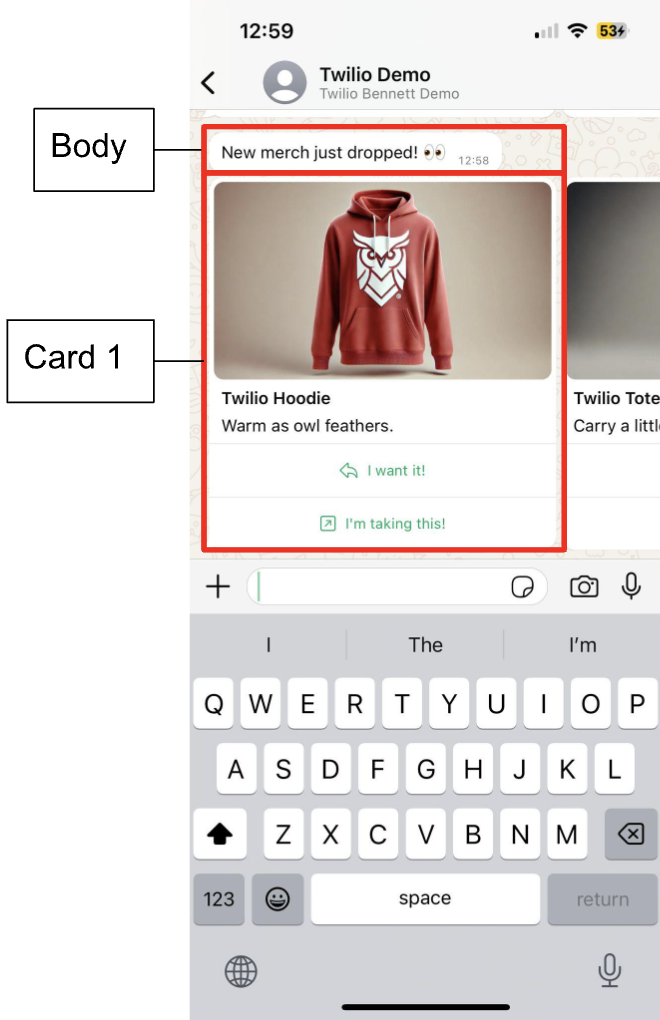
The `twilio/carousel` content type helps end users select services, products, or options that are relevant to the context of the conversation.
End users can do the following:
* Send a horizontally scrolling list of carousel cards.
* Send media, text, call to action buttons, and quick reply buttons in each carousel card.
* Send any combination of quick reply, url, and phone call buttons in each card. Multiple of the same type of buttons are also allowed so long as there are 1 to 2 buttons in each card.
* Media can be images or videos.
> \[!NOTE]
>
> To send a carousel to open a business initiated session or to reply within a 24 hour user initiated session, content template approval is required.
## Supported channels
* RCS
* WhatsApp
> \[!NOTE]
>
> Carousels sent over RCS don't support body text. Defined body text will be dropped when sending carousel over RCS.
## Message preview
|  |  |
| ------------------------------------------------------------------------------------------------------------------------------------------------------------------------------------------------------------ | -------------------------------------------------------------------------------------------------------------------------------------------------------------------------------------------------------------------------------- |
|  |  |
| ----------------------------------------------------------------------------------------------------------------------------------------------------------------------------------------------- | ---------------------------------------------------------------------------------------------------------------------------------------------------------------------------------------------------------------- |
## Data parameters
| Parameter | Type | Required | [Variable support](/docs/content/using-variables-with-content-api) | Description |
| --------- | ------ | -------- | ------------------------------------------------------------------ | ---------------------------------------------------------------------------- |
| `body` | string | Yes | Yes | Content of the initial message delivered to the end user above the carousel. |
| `cards` | array | Yes | No | Array of carousel cards to be sent. |
### `cards` properties
| Property | Type | Required | [Variable support](/docs/content/using-variables-with-content-api) | Description |
| --------- | ------ | -------- | ------------------------------------------------------------------ | -------------------------------------------------------------------------------------------------------------------------------------------------------------------------------------------------------------- |
| `title` | string | No | Yes (RCS), No (WhatsApp) | The header text of each carousel card.
Maximum length: 160 characters combined with the `body` text. |
| `body` | string | Yes | No | The body text of each carousel card.
Maximum length: 160 characters combined with the `title` text. |
| `media` | string | Yes | Yes | The URL of the media appearing as the header of each card. Variables are only supported after the domain. For example: `www.twilio.com/images/\{\{1}}`. Only images and videos are supported within carousels. |
| `actions` | array | Yes | Yes | Defines buttons. All carousels must contain at least one button and no more than two buttons. |
### `actions` properties
> \[!NOTE]
>
> The order of `QUICK_REPLY`, `URL`, and `PHONE_NUMBER`buttons in a card must appear in the same order for every card.
| Property | Supported channels | Parameters |
| -------------- | -------------------------------------- | ------------------------------------------------------------------------------------------------------------------------------------------------------------------------------------------------------------------------------------------------------------------------------------------------------------------------------------------------------------------------------------------------------- |
| `QUICK_REPLY` | | - **`type`**: `QUICK_REPLY`
- **`title`**: Button text of quick reply button. Appears in `Body` and `ButtonText` fields in inbound when selected by end user. Variables are supported in session.
Maximum length: 25 characters - **`id`**: Not visible to end user. Appears in `ButtonPayload` fields in inbound when selected by end user. Variables are supported.
|
| `URL` | | - **`type`**: `URL`
- **`title`**: Button text of URL redirect button. Variables aren't supported.
Maximum length: 25 characters - **`url`**: URL opened when end user clicks the button. Variables are supported at the end of the URL string.
|
| `PHONE_NUMBER` | | - **`type`**: `PHONE_NUMBER`
- **`title`**: Button text of URL redirect button. Variables aren't supported.
Maximum length: 25 characters - **`phone`**: [E.164](/docs/glossary/what-e164) formatted phone number to call when the recipient taps the button. Variables aren't supported.
|
## Code examples and responses
Create twilio carousel content template
```bash
curl -X POST 'https://content.twilio.com/v1/Content' \
-H 'Content-Type: application/json' \
-u $TWILIO_ACCOUNT_SID:$TWILIO_AUTH_TOKEN \
-d '{
"friendly_name": "twilio_deal",
"language": "en",
"variables": {
"1": "Twilio"
},
"types": {
"twilio/carousel": {
"body": "New {{1}} merch just dropped! 👀",
"cards": [
{
"title":"Twilio Hoodie",
"body":"Warm as owl feathers.",
"media":"https://sienna-grasshopper-3262.twil.io/assets/hoodie.jpeg",
"actions":[
{
"type":"QUICK_REPLY",
"title":"I want it!",
"id":"want_hoodie"
},
{
"type":"URL",
"title":"I am taking this!",
"url":"https://sienna-grasshopper-3262.twil.io/assets/hoodie.jpeg"
}
]
},
{
"title":"Twilio Tote",
"body":"Carry a little more.",
"media":"https://sienna-grasshopper-3262.twil.io/assets/tote.jpeg",
"actions":[
{
"type":"QUICK_REPLY",
"title":"I want it!",
"id":"want_tote"
},
{
"type":"URL",
"title":"Take the tote!",
"url":"https://sienna-grasshopper-3262.twil.io/assets/tote.jpeg"
}
]
},
{
"title":"Twilio Bucket Hat",
"body":"Stay in the shade.",
"media":"https://sienna-grasshopper-3262.twil.io/assets/hat.jpeg",
"actions":[
{
"type":"QUICK_REPLY",
"title":"I want it!",
"id":"want_hat"
},
{
"type":"URL",
"title":"Hand me the hat!",
"url":"https://sienna-grasshopper-3262.twil.io/assets/hat.jpeg"
}
]
},
{
"title":"Twilio Mug",
"body":"Sip a little.",
"media":"https://sienna-grasshopper-3262.twil.io/assets/mug.jpeg",
"actions":[
{
"type":"QUICK_REPLY",
"title":"I want it!",
"id":"want_mug"
},
{
"type":"URL",
"title":"Make me a mug!",
"url":"https://sienna-grasshopper-3262.twil.io/assets/mug.jpeg"
}
]
}
]
}
}
}'
```
```json
{
"account_sid": "ACXXXXXXXX",
"date_created": "2024-07-24T20:35:59Z",
"date_updated": "2024-07-24T20:35:59Z",
"friendly_name": "twilio_deal",
"language": "en",
"links": {
"approval_create": "https://content.twilio.com/v1/Content/HXxxxxxxxxx/ApprovalRequests/whatsapp",
"approval_fetch": "https://content.twilio.com/v1/Content/HXxxxxxxxxx/ApprovalRequests"
},
"sid": "HXxxxxxxx",
"types": {
"twilio/carousel": {
"body": "New {{1}} merch just dropped! 👀",
"cards": [
{
"actions": [
{
"id": "want_hoodie",
"index": 0,
"title": "I want it!",
"type": "QUICK_REPLY"
},
{
"title": "I'm taking this!",
"type": "URL",
"url": "https://sienna-grasshopper-3262.twil.io/assets/hoodie.jpeg"
}
],
"body": "Warm as owl feathers.",
"media": "https://sienna-grasshopper-3262.twil.io/assets/hoodie.jpeg",
"title": "Twilio Hoodie"
},
{
"actions": [
{
"id": "want_tote",
"index": 0,
"title": "I want it!",
"type": "QUICK_REPLY"
},
{
"title": "Take the tote!",
"type": "URL",
"url": "https://sienna-grasshopper-3262.twil.io/assets/tote.jpeg"
}
],
"body": "Carry a little more.",
"media": "https://sienna-grasshopper-3262.twil.io/assets/tote.jpeg",
"title": "Twilio Tote"
},
{
"actions": [
{
"id": "want_hat",
"index": 0,
"title": "I want it!",
"type": "QUICK_REPLY"
},
{
"title": "Hand me the hat!",
"type": "URL",
"url": "https://sienna-grasshopper-3262.twil.io/assets/hat.jpeg"
}
],
"body": "Stay in the shade.",
"media": "https://sienna-grasshopper-3262.twil.io/assets/hat.jpeg",
"title": "Twilio Bucket Hat"
},
{
"actions": [
{
"id": "want_mug",
"index": 0,
"title": "I want it!",
"type": "QUICK_REPLY"
},
{
"title": "Make me a mug!",
"type": "URL",
"url": "https://sienna-grasshopper-3262.twil.io/assets/mug.jpeg"
}
],
"body": "Sip a little.",
"media": "https://sienna-grasshopper-3262.twil.io/assets/mug.jpeg",
"title": "Twilio Mug"
}
]
}
},
"url": "https://content.twilio.com/v1/Content/HXxxxxxxxxx",
"variables": {
"1": "Twilio"
}
}
```
## Sending your message template
Sending a carousel template using content templates works the same way as sending other types of content templates. Learn how to [send templates created with the Content Template Builder](/docs/content/send-templates-created-with-the-content-template-builder).
## Receiving webhooks
The webhook payload includes the following fields:
| Component | Description |
| --------------- | --------------------------------------------------------------------- |
| `Body` | The button text of the quick reply button that the end user selected. |
| `ButtonText` | The button text of the quick reply button that the end user selected. |
| `ButtonPayload` | The ID of the button that the end user selected. |